

Milestone 01 / BayFlow
Building a booking application around the work
From the earlier saved version to September 27, 2026 · Public booking, the reservation desk, and the awkward parts that connect them.
BayFlow is the booking application I’ve been building for Ballistic Indoor Golf, my family’s business. It now connects the customer booking flow with the reservation desk: choosing a room, reserving time, keeping customer information, running a session, and dealing with changes afterwards.
That description sounds fairly straightforward. The development wasn’t.
The earlier version already had a lot in it. But having a schedule, customer profiles and booking forms is one thing. Using them while someone is on the phone, trying to reserve two rooms, or standing at the counter is where the awkward parts start showing up.
A lot of this project has been working through those awkward parts. Sometimes that meant changing the interface. Sometimes it meant deciding what the application should actually be responsible for. And sometimes it meant finding out why something that appeared to work earlier was behaving differently a few hours later.
The early UX explored a broader platform
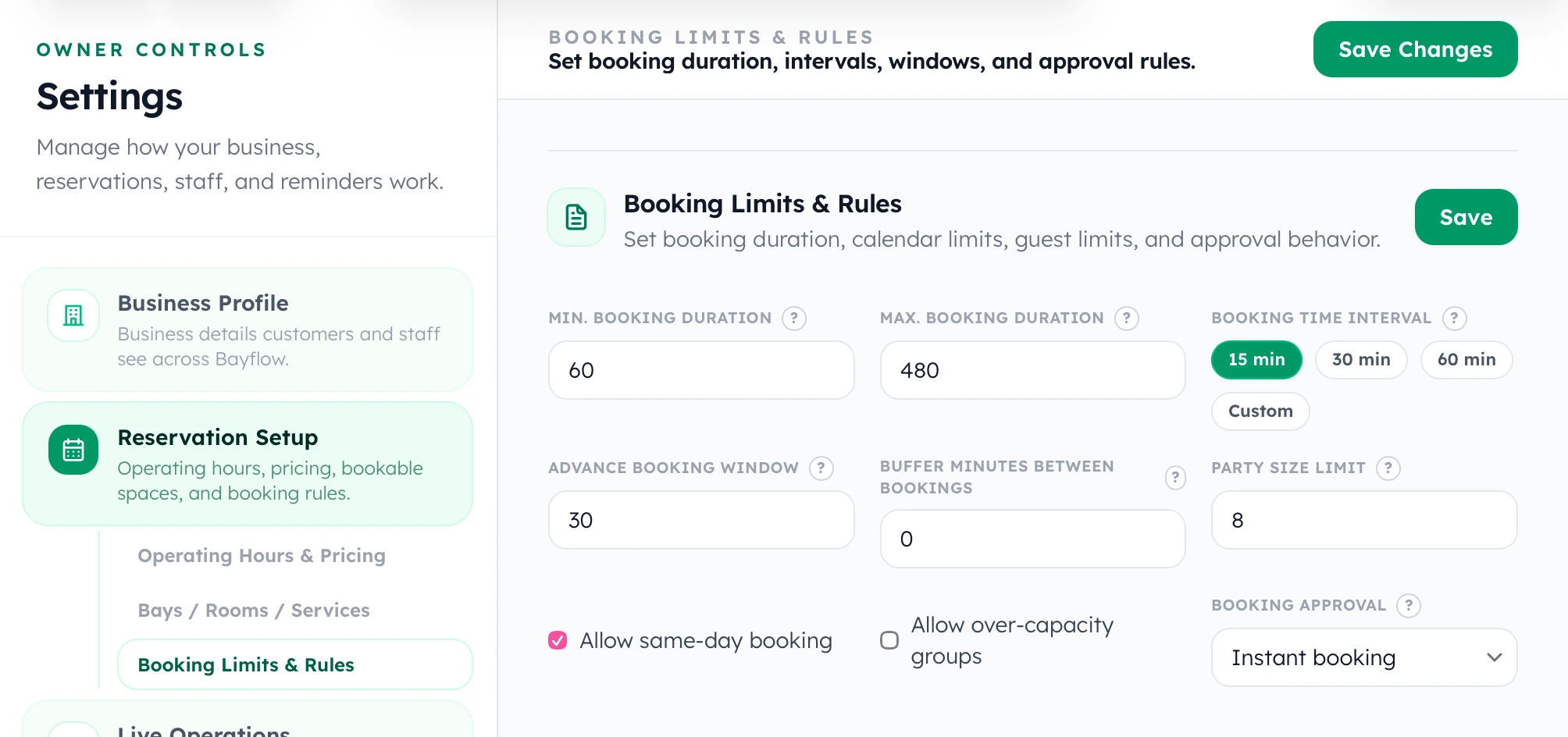
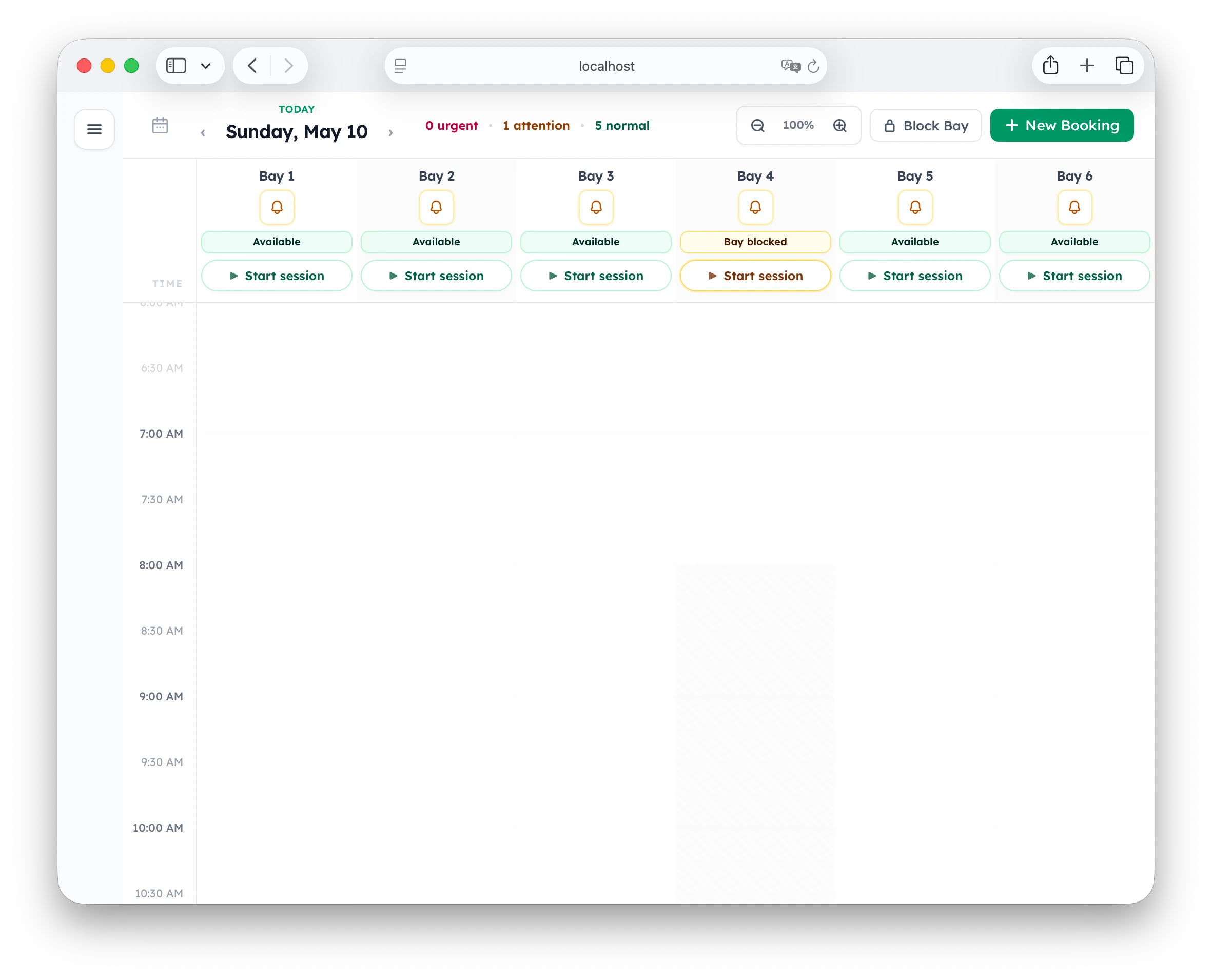
I first worked on BayFlow for a couple of weeks, mainly on the UX. These April and May 2026 screenshots preserve the design state before I put the project down for a few months. They show what I was exploring, rather than establish that every part was fully working.
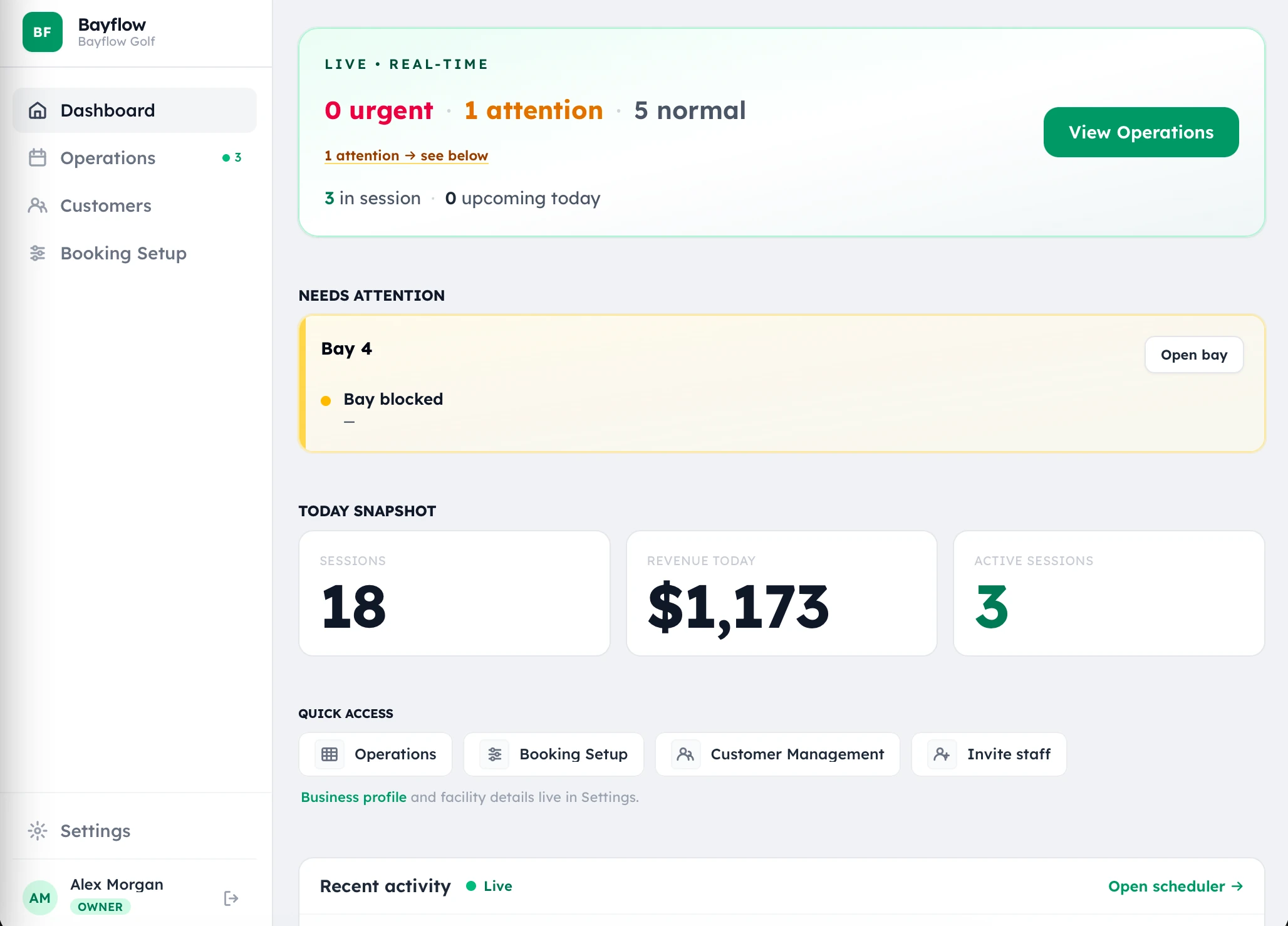
At that point, I was trying to design for other indoor golf businesses as well. BayFlow had the shape of a broader booking platform: an operations schedule, an owner dashboard and settings for how a business wanted its bookings to work.
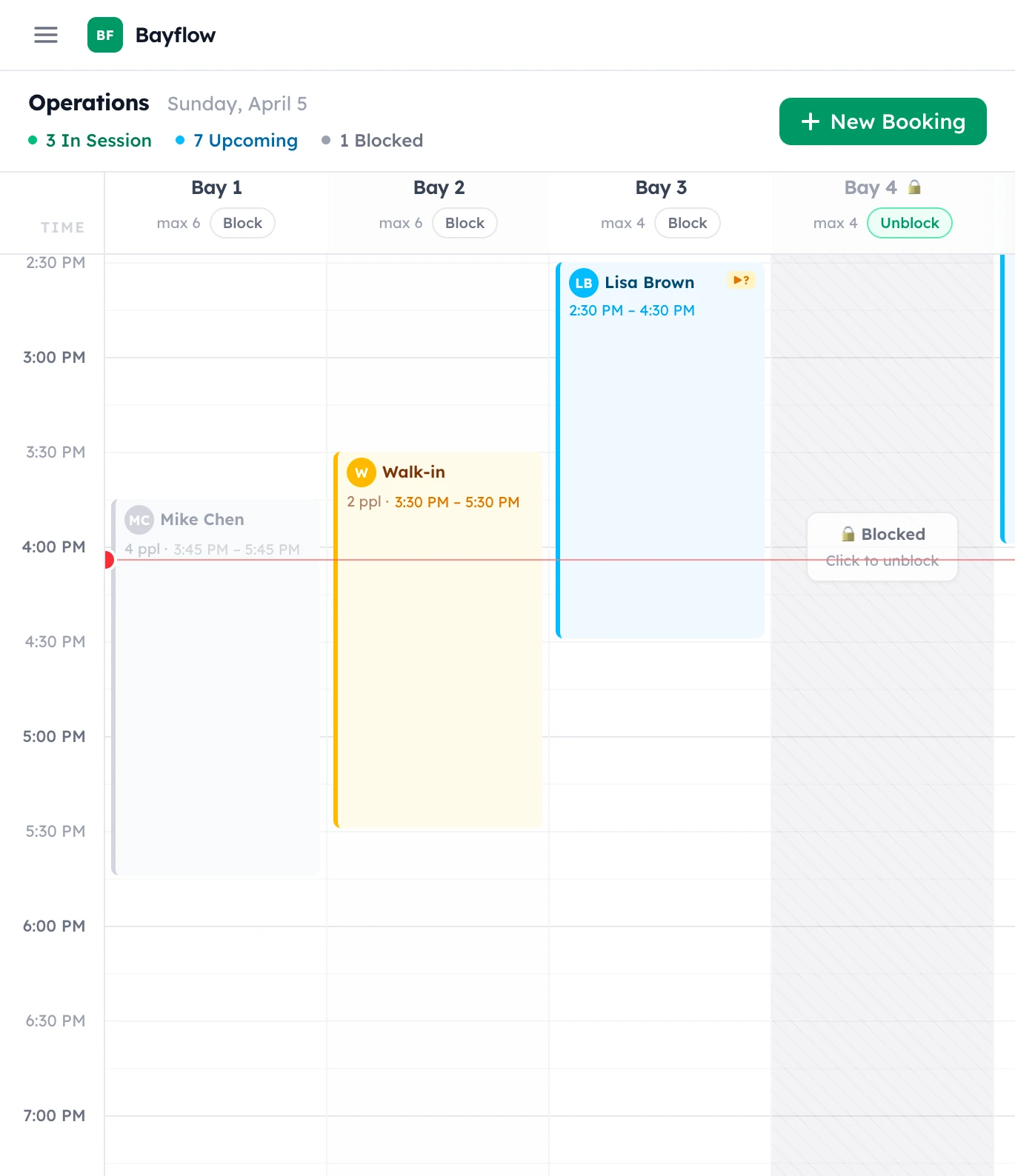
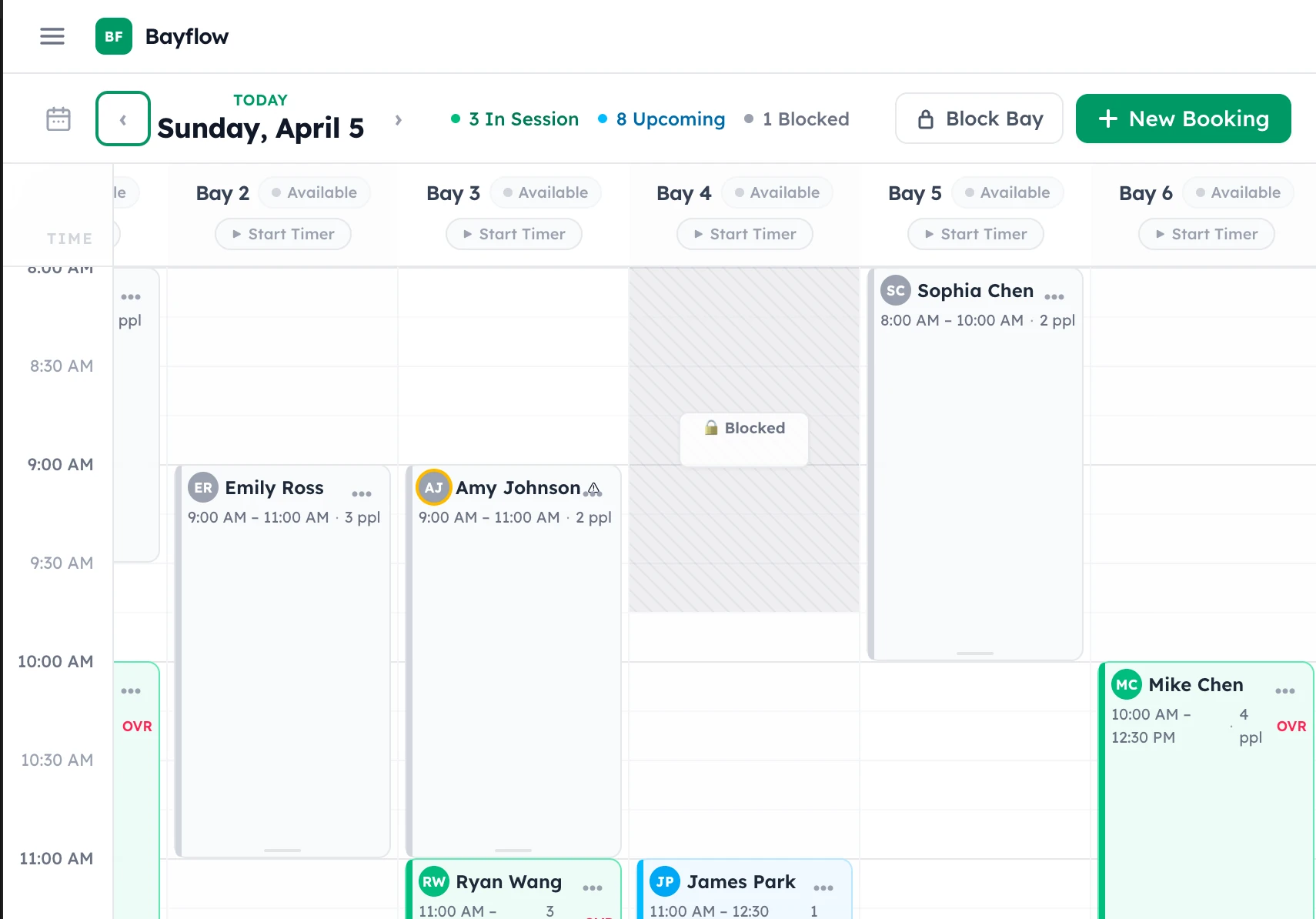
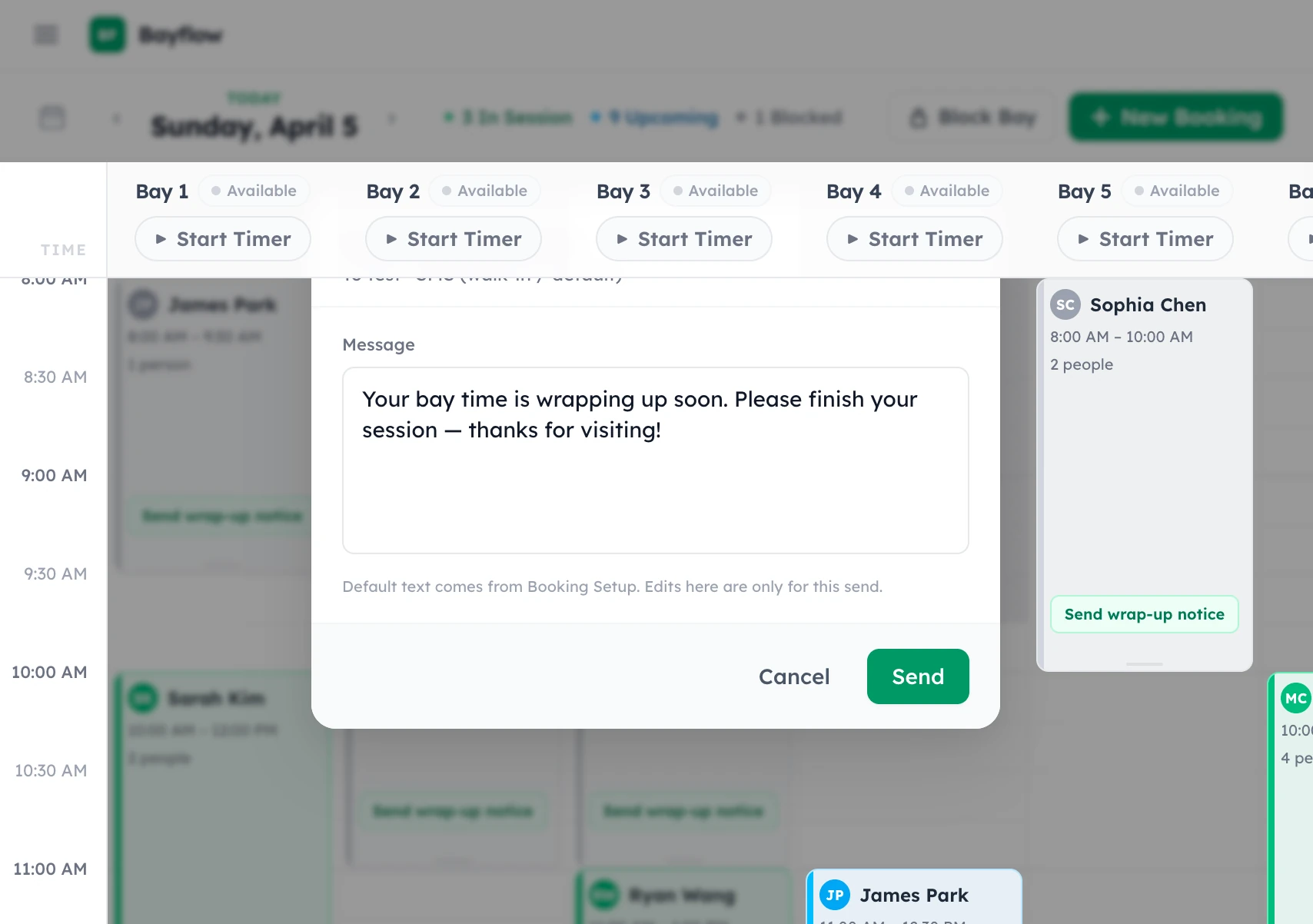
The screenshots show several iterations of that UX: bookings and walk-ins on a time grid, blocked bays, bay-level session controls and a wrap-up message. The settings explored configurable durations, booking intervals, advance windows, buffers, party sizes and approval rules. That flexibility was part of trying to accommodate different businesses.
When I came back to the project, I fleshed it out specifically for Ballistic Indoor Golf. The current version accounts for how Ballistic operates. It does not establish that those workflows would fit another indoor golf business. Looking at the two versions together, that is the significant shift: from a broader UX exploration to a system shaped around one actual venue.
Bringing it back to Ballistic
By late August and early September, the focus was getting BayFlow usable for Ballistic’s own booking process and replacing the Microsoft booking workflow.
That meant drawing a boundary around the application. Reservations, customers, room availability, operating hours and session timing belonged together. Taking over the point-of-sale system, food and drink sales, receipts and accounting would have made this a different project.
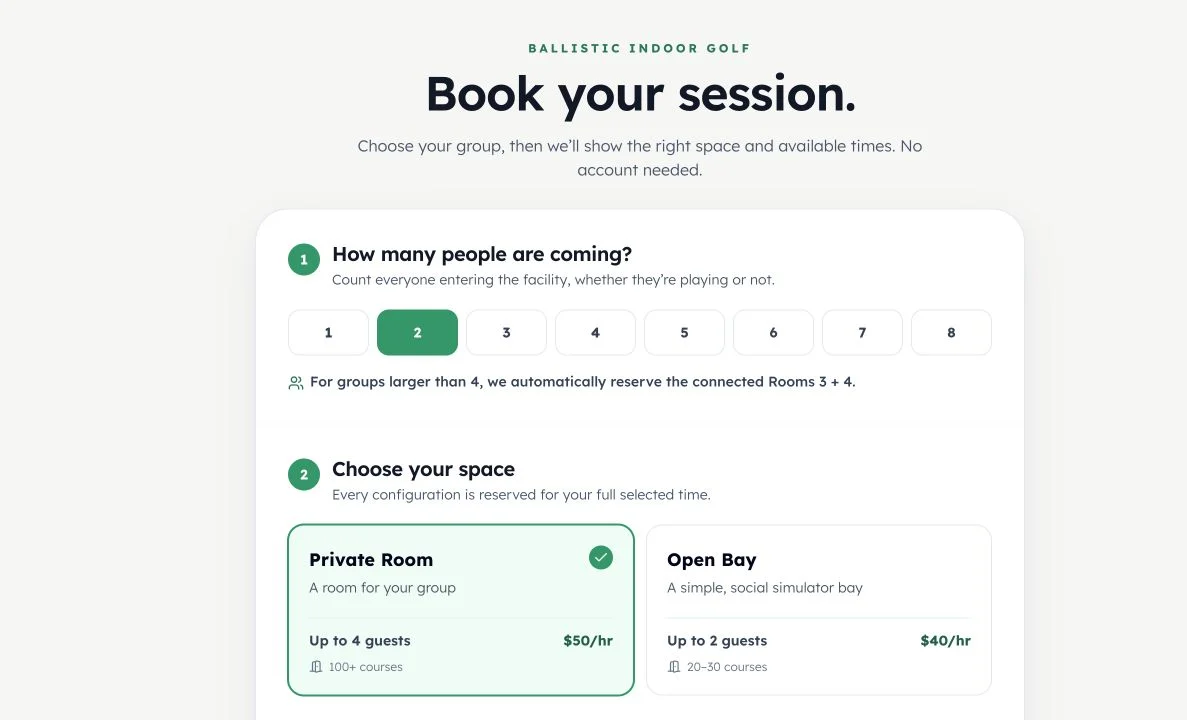
The physical venue also needed to be represented properly. A private room and an open bay aren’t interchangeable labels. Capacity and simulator compatibility affect what someone can book. Operating hours affect both what customers can select and what owners see on the schedule.
I wanted those hours to be manually editable in BayFlow. An automatic update from Google was considered and dropped. The people operating the venue needed control over the schedule, with the booking flow following those saved hours.
The customer flow also needed a clear limit. Normal public bookings were for an individual space, with up to four people. More involved arrangements could be handled by the owners. That kept the public flow manageable while leaving room for the reservation desk to deal with situations that didn’t fit it.
Opening the booking flow to customers
The customer-facing version gave people a direct way to choose a date and time, enter their party size, select a compatible room or bay, review the details and confirm. Payment remained at the facility.
I wanted normal bookings to confirm immediately. Making every customer wait for manual approval would have put another task back on the owners. Bookings that required owner review could remain separate, without being presented as confirmed too early.
The public flow also had to agree with the owner schedule. If we took a phone booking or added a walk-in, that space needed to stop appearing as available online. If two customers tried to reserve the same opening, the application had to make the final decision when saving the booking, even if both had seen an available slot moments earlier.
That work extended beyond the form. The booking rules had to account for operating hours, time increments, available spaces and turnaround time between reservations. Availability on a screen is only useful if the saved reservation follows the same rules.
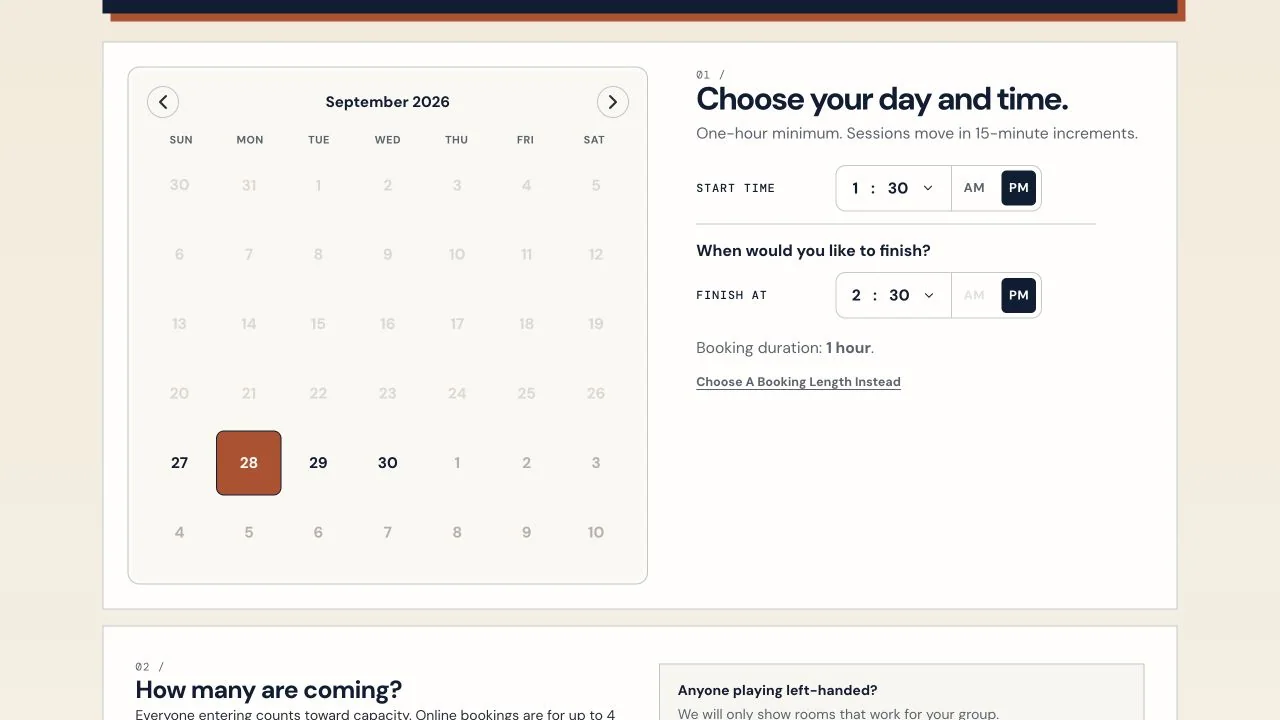
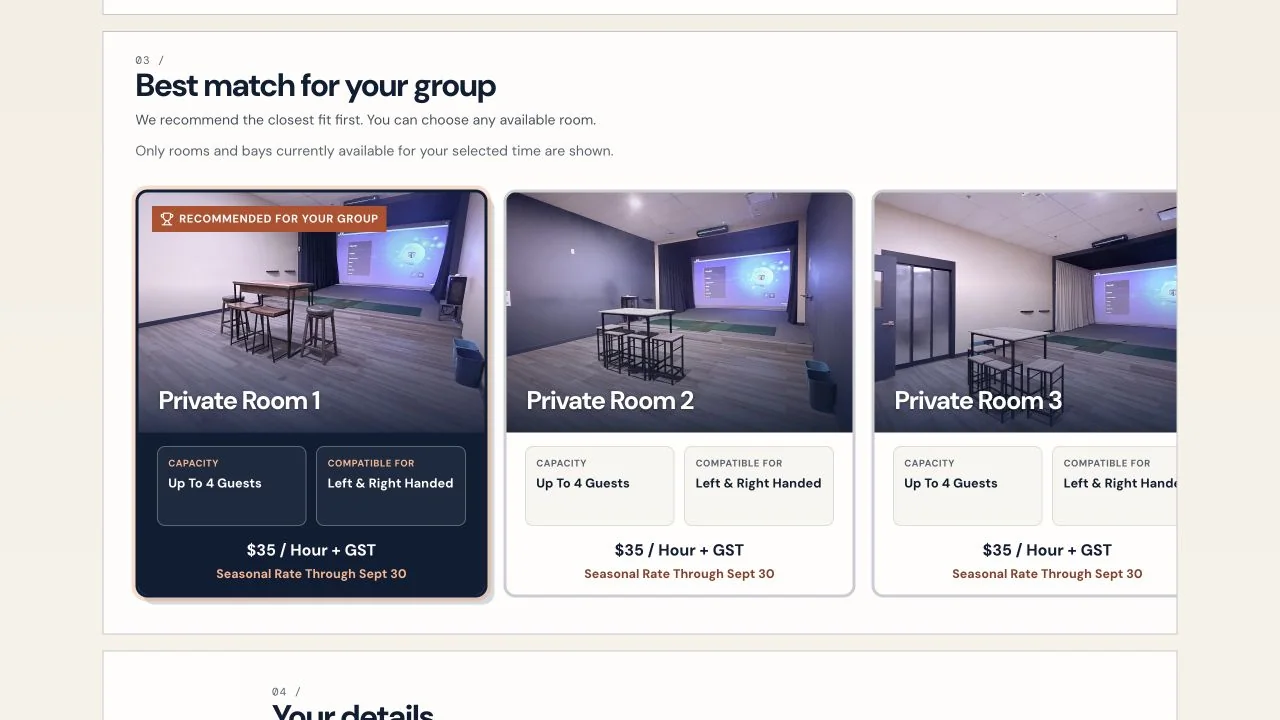
The interface went through its own revisions. The calendar became the date-selection surface. Start time, end time and duration needed a clearer relationship. The review step became a compact reservation summary. Room cards gained actual venue photos, then went through several layout changes so choosing one didn’t make the surrounding layout jump around.
The details mattered: showing the selected duration, keeping quarter-hour choices visible, distinguishing a recommended room from the room someone had actually selected. Each one addressed a point where the customer could hesitate or misunderstand what they were booking.
Getting it off my computer
The early September work also brought BayFlow into a hosted setup on Railway, connected to the Ballistic website through the public booking embed.
That introduced another set of requirements. A new production setup couldn’t start with fictional customers or demo reservations. Booking data needed to survive a restart. Owner access needed to be configured deliberately. Public pages needed access to booking information without exposing customer records, internal notes or the private schedule.
Confirmation and cancellation emails became part of the flow, along with owner notifications and arrival reminders. The emails needed to use the actual configured room names. A customer shouldn’t receive an internal identifier and have to work out which room it means.
Phone bookings and walk-ins needed slightly different handling, too. An owner could choose to send a confirmation email when creating a reservation, without making email a mandatory part of every walk-in.
Hosting also produced failures that weren’t visible in a local preview. At one point the owner side reported authentication problems and then returned a Railway error page. A temporary server failure was being treated as a reason to clear the owner’s saved session. That was changed so an interruption didn’t automatically become a forced sign-in.
There were runtime and deployment fixes as well, followed by release safeguards. Getting a successful build was one step. Keeping the desk usable through restarts, updates and temporary failures was another.
Actual bookings exposed the contact workflow
One of the clearest problems came from a phone reservation for two rooms under the same host.
I had to create the rooms individually and repeat the host’s information. The application understood separate bookings, but the interaction didn’t properly support the person making one arrangement across multiple spaces.
That same booking exposed a customer-profile problem. The system found an older, incomplete walk-in record. Selecting it replaced the newer information I had just entered, even though the older record was missing details.
Matching the customer was useful. Losing the information I was collecting was not.
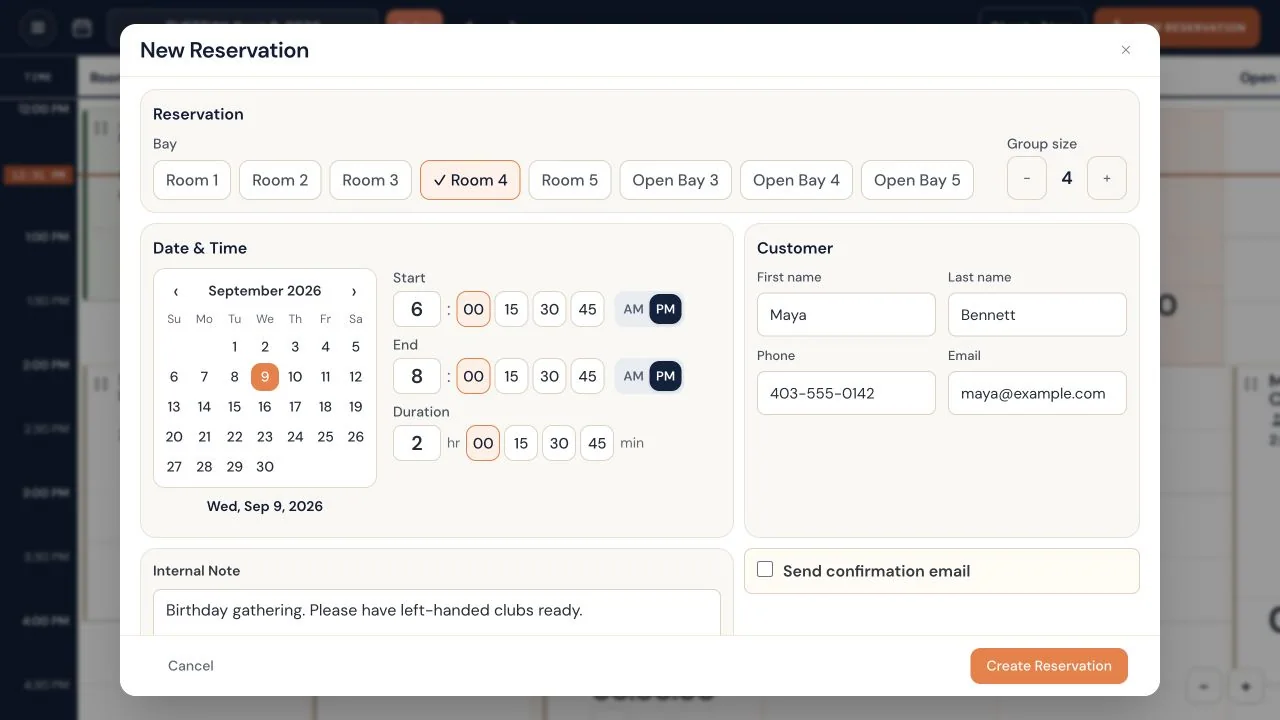
The reservation workflow was revised around selecting and verifying a customer, editing contact details, and linking multiple rooms under the same host, date and time. The matching interaction also became more deliberate. A shared or previously used phone number shouldn’t silently decide who a booking belongs to.
Existing Microsoft Bookings customers were brought into the application during this period, so working with older records mattered as much as creating new ones.
This was a very practical kind of design problem. I needed to be able to stay with the conversation, check the person’s details and finish the reservation without entering the same information repeatedly or undoing what the form had just overwritten.
Making the reservation desk easier to read and use
The owner interface went through repeated changes alongside the booking logic.
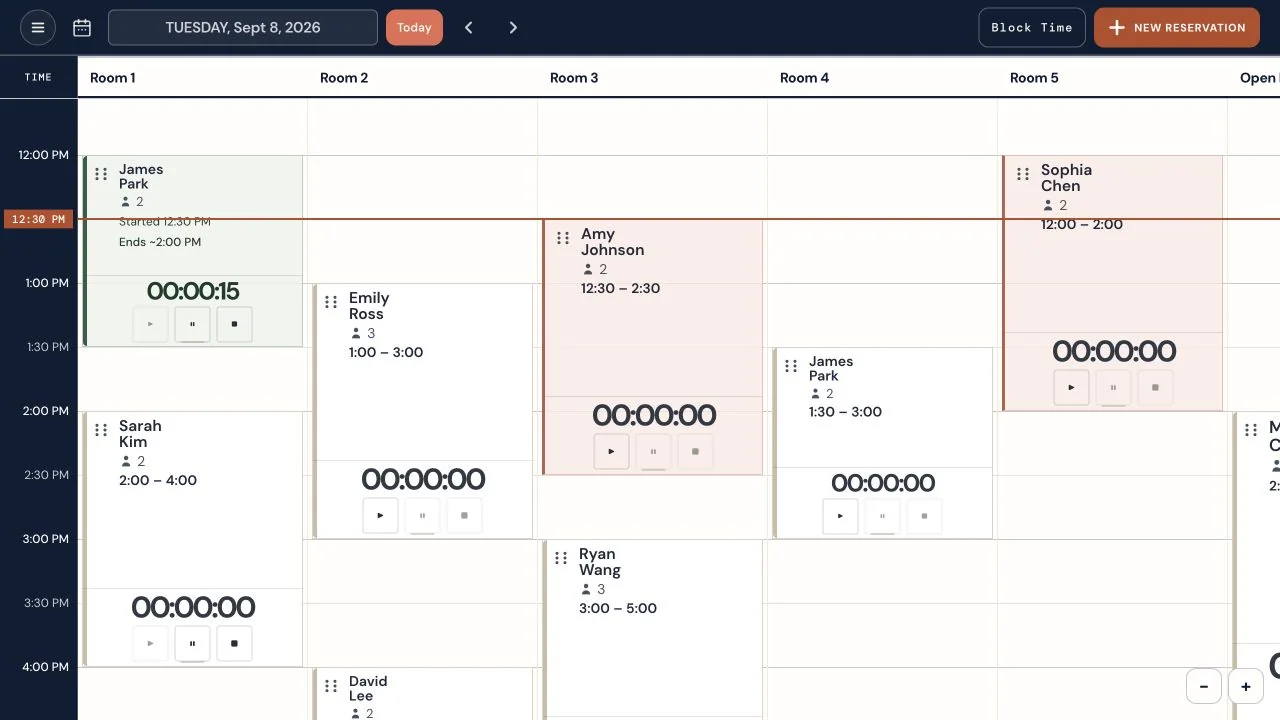
The schedule needed to hold a lot of information, but the hierarchy wasn’t always helping. Names and booking times needed to be more readable. The grid needed a clearer distinction between whole hours and half-hour divisions. Zooming needed to keep the relevant part of the schedule in view, and booking cards needed to adapt to the space available.
The reservation form had similar problems. At one point the popup was cutting off at the top of the screen. I liked the information it contained, but not the layout. Start and end time needed to work as a pair, with duration connected to them. AM and PM needed a clearly visible selected state. Bare plus and minus controls weren’t enough to explain what would change.
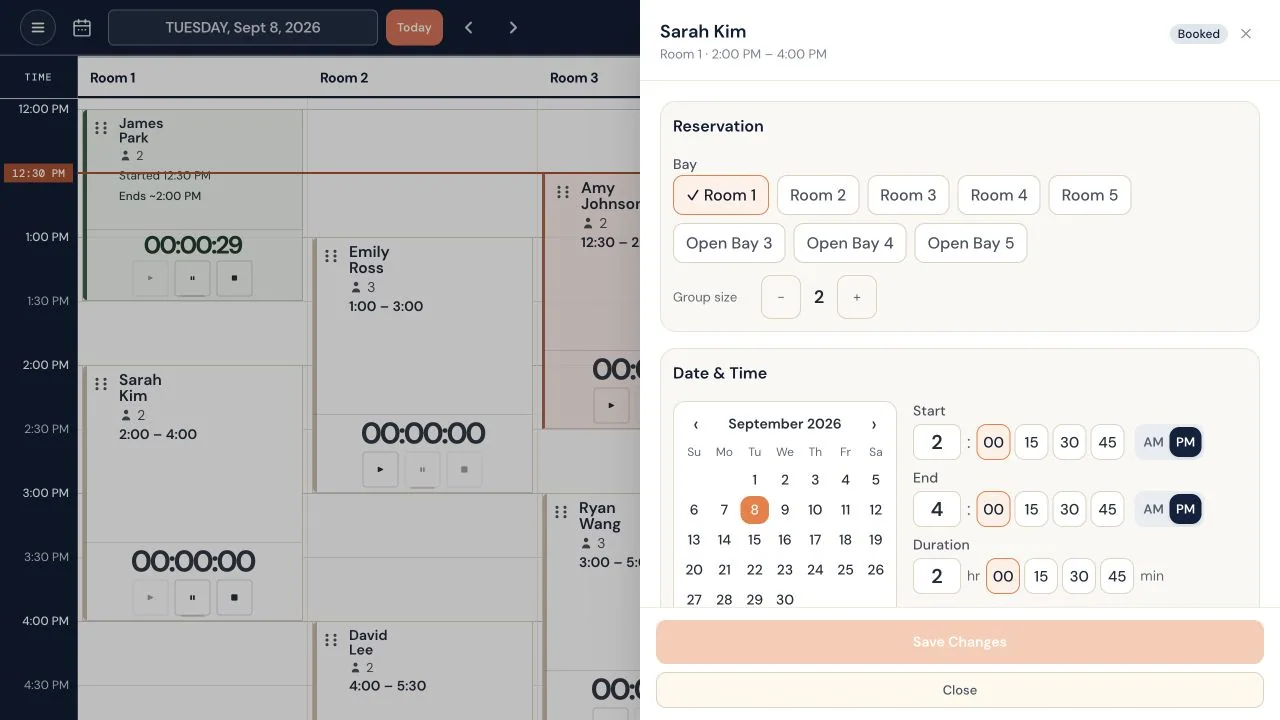
There were interaction fixes underneath those visual changes: opening the right reservation, keeping keyboard focus inside a dialog, making long forms usable within the viewport, and preserving entered changes when a save failed.
I specifically wanted the overlay and save behaviour fixed before more layout refinement. A cleaner form doesn’t help much if it loses the draft or gives the impression that an edit saved when it didn’t.
The timers became a larger problem than their controls
Timer work kept returning throughout development.
Initially, there were controls associated with the bay headers. I preferred having the timer inside the booking card with its related information. That made the association much easier to follow: this timer belongs to this reservation.
But moving the controls didn’t settle the underlying behaviour.
The application needed to keep track of which session a timer belonged to, what happened when a room turned over to the next booking, whether the displayed controls were stale, and what a stopped session should show later.
One reported failure was particularly confusing. I had stopped two timers earlier in the evening. A few hours later, the schedule was displaying them in a way that didn’t agree with what I remembered stopping.
The later fixes tightened how timers were associated with bookings and how elapsed time was displayed. A completed or stopped session needed to use its recorded state, instead of appearing to continue from an earlier start time. The cards also gained clearer stopped-time information.
This part of the application has had several rounds of correction. It deserves that attention because the schedule is something we need to trust while operating the venue.
The timer also became the deliberate trigger for a post-visit review request. I wanted that tied to staff ending the session, with duplicate suppression, rather than sending repeated requests or treating any generic status change as proof that a visit had finished.
The experience continues after confirmation
The booking flow gradually extended beyond the moment someone pressed Confirm.
A shareable Ballistic booking page became the confirmation destination, giving the booking holder something they could forward to the other people coming. The page brought reservation context and arrival information together, including an entrance map.
The branding also became more intentional. Public booking and sharing should feel like Ballistic. BayFlow remains the name of the internal application. Customers don’t need to understand the software behind the reservation in order to recognize where they booked.
Cancellations and change requests needed different behaviour. A customer asking to arrive late, stay longer, change their party size or move a booking hasn’t necessarily made a change the venue can accommodate.
The first structured change-request flow let customers submit those requests for staff review. It left the original reservation intact while the owners decided what to do.
The latest work closes the owner side of that loop
The newest local work develops the change-request flow into an owner queue.
Owners can see open requests, inspect the structured details, open the associated reservation, and record how the request was handled. Resolved requests retain an outcome and private note, along with who resolved them and when.
The boundary is deliberate: resolving the request does not edit the booking or send the customer a message. The owner still needs to make any agreed reservation changes and communicate with the customer. Marking a request resolved records that work; it doesn’t pretend to perform it.
The queue also has a shared open-request count, links from the owner navigation and dashboard, and updates across open staff views. Failed loading keeps previously loaded requests visible with an error instead of presenting a misleading empty list.
Owner email alerts support that workflow, but the queue remains the record of the request. An email failure shouldn’t undo a request the customer successfully submitted.
Another recent reliability change concerns booking verification. If a submission fails or its result is uncertain, the form needs fresh verification before another attempt while preserving the details the customer entered. It shouldn’t automatically submit again when there might already be a booking.
Where it stands now
As of this September 27 review, BayFlow’s current local application brings together public booking, the owner schedule, customer records, reservation editing, session timers, confirmation and cancellation flows, a shareable booking page, and the expanded change-request workflow.
The latest change-request queue is present in the working copy and has documented local testing. It is still uncommitted in this checkout, so I’m not describing that newest part as released. The recorded validation includes automated tests and local browser checks with fictional customers; separate-device behaviour and real receipt of its notification emails remain unverified.
The April and May screenshots give this history an earlier UX starting point. They preserve the direction I was exploring before the pause, without establishing the exact day the idea began.
What the available history does show is a product becoming more closely connected to the work of running the venue. The changes range from choosing a real room photo to preventing an incomplete customer record from replacing better information, or making sure a stopped timer stays stopped.
That is where much of the development has gone: following a booking through the situations we actually encounter, finding the parts that are confusing or fragile, and making the application handle them more clearly.