

Milestone 02 / care = love
Building a collection I can actually come back to
August 17–October 16, 2026: the collection, routine, and care log, with a local catalog for saving product references.
I wanted a skincare inventory app. Somewhere to keep my skincare, haircare, and body care products, remember the purchases I made, and write down what I thought of them. The point was to have my own list of products I’d tried and loved when I was considering buying something again.
I’m still the user and the only user tester. This is a record of the decisions and local development so far, not a claim that the app has been validated with a wider audience.
August: the inventory and the observation
The first recorded repository baseline, on August 17, separated Inventory from Mirror. One held products and personal impressions; the other held observations that could be connected to products. Records stayed local. Linking a product to an observation did not mean the product caused the change.
Through August 19–22, those ideas developed into Pouch and Pond, alongside Garden as a reading space. Product capture grew to include photos, text and barcode recognition, manual search, and public catalog matching. Product detail started separating sourced product facts from my own experience.
The visual language went through several attempts: botanical scenes, jelly-like surfaces, mesh, water, and later a quieter cream-and-olive direction. These weren’t all final decisions. The archive contains explorations, corrections, and rejected directions as well as working screens.
Photo cropping and foreground-isolation work addressed a practical need: recognising what I own. Difficult packaging still needs review. A transparent bottle or reflective pouch is not automatically a good cutout just because an isolation feature exists.
September: making the experience quieter
The native design moved toward compact sans-serif typography, cream paper, olive ink, restrained ochre, and fine grain. Home offered a quick note, products in rotation, and the latest observation. Pouch and Pond became drawer-like experiences; Garden remained a destination.
A separate private web companion also explored products, photos, lifecycle states, and dated notes. It had its own storage. That experiment is part of the development history, but it is not evidence that the native app, web companion, and later catalog now share one synchronised database.
October 4: the screen was asking a different question
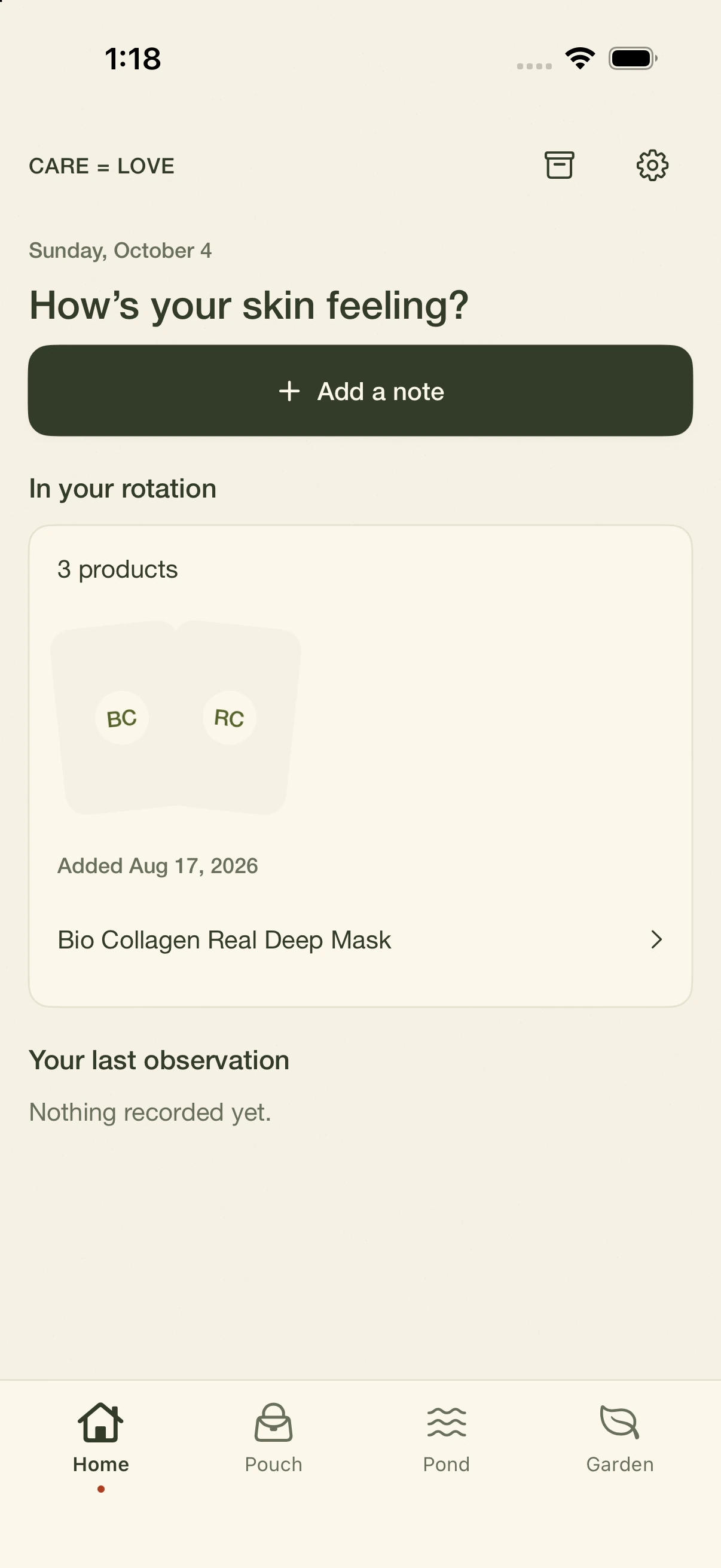
Looking at Home brought me back to the reason I wanted the app.
“How’s your skin feeling?” and the large “Add a note” button made observation the dominant activity. Morning and night routines weren’t visible. The rotation card said “3 products,” showed two faint placeholders, and named a single mask. It occupied a lot of space without making the collection clear.
That was my design review of my own app. It wasn’t a usability finding from other people. But it exposed the mismatch: I was trying to build a memory of what I own and what I’ve tried, while the first screen mostly asked me to journal about my skin.
Starting with the collection and current rotation
I wanted the starting point to be the products I’m actually using, with room for morning and night routines. Not everyone has separate routines, so that preference needs to be part of setup rather than an assumption buried in the interface.
The source developed care-area assignments, routine timing, personal tags, reviews, repurchase intent, and purchase records attached to the same product. A repeat purchase should not force me to start a disconnected product history.
The current native navigation uses Basket, Greenhouse, and Meadow. Those are the labels visible in the October 16 screenshots. Earlier conversations used Pouch, Pond, and Garden; I’m keeping the distinction explicit rather than rewriting the history as though the names never changed.
Getting products in without photographing everything
Adding products became its own problem. I wanted a fast way to save something using a barcode, photo recognition, a product link, or an ingredient list, then edit the record later.
The friction I described was specific: information could be technically correct while appearing multiple times under different wording or formatting, and some products were missing entirely. That led to the local catalog work. I wanted a product database I could keep adding to as I found products online.
The implementation now includes a local catalog service and an editable reference library. Link import checks for an existing saved source first. For an unknown link, it tries structured product information and basic page metadata, then returns a draft for review. It does not reliably read every retailer or JavaScript-heavy product page. A failed import still needs a manual path.
The catalog stores product facts separately from my personal inventory record. A catalog match can provide a reference identity; my review, routine, and purchase history remain personal. This is an editable local catalog, not a complete database of every skincare product.
I explicitly deferred recording prices in this catalog flow. The native app contains separate purchase-price and range features; that does not change the decision to leave price extraction out of link import.
Product images without asking every company every time
I wanted product pictures saved too, but asking each company about each image would add a lot of maintenance to a personal inventory.
The implemented fallback is conservative: imported drafts do not automatically save a manufacturer’s product photo. The service marks image permission as unknown and leaves the image URL empty. Original product-category doodles give the catalog a visual fallback.
Those doodles are illustrations, not evidence of the exact packaging. The catalog does not yet have a complete source-level image-permission system that automatically establishes reuse rights.
Giving the catalog a structure
The Notion taxonomy introduced care areas with categories under each: Face, Hair, Body, Oral, and Nails. The catalog editor now uses Care area followed by a searchable Category, filtered to the chosen area. The old “Product type” label was removed.
This matters when the same category name means different things in different contexts. A face cleanser and a hair cleanser should not be treated as interchangeable simply because both say “Cleanser.” The illustration mapping can use the area as well as the category.
The layout also went through a more concrete refinement: a compact library beside the editor on larger windows, stacked panels on narrow screens, paired fields, matching dropdown heights and arrows, and barcode entry moved into an optional section beneath the product-link field.
Barcode lookup currently searches records already saved in the local catalog. It is not a universal barcode database. Product format and function tags remain a larger modelling question; the implemented area/category picker should not be mistaken for a complete structured taxonomy of every product attribute.
A catalog I can open on my Mac
The catalog became a double-clickable Mac app with its own window. It starts the local service automatically instead of requiring me to open a terminal first.
The app copies a catalog snapshot on first launch and then keeps its working database in Application Support. Rebuilding the wrapper should not overwrite that working database. The original project database remains a separate snapshot, which is important when thinking about backups and future changes.
The earlier launch check confirmed that the saved 345 Relief Cream record survived quitting and reopening. The wrapper uses Python already installed on this Mac. It is locally signed, not a notarised app prepared for general distribution.
October 16: the collection, routine, and care log
Today’s native version makes the three main activities more visible.
Basket brings the routine summary and collection together. The captured sample state shows “Water / rinse” as a routine action, followed by product cards with lifecycle states. Search sits below the collection, and the three destinations remain available at the bottom.
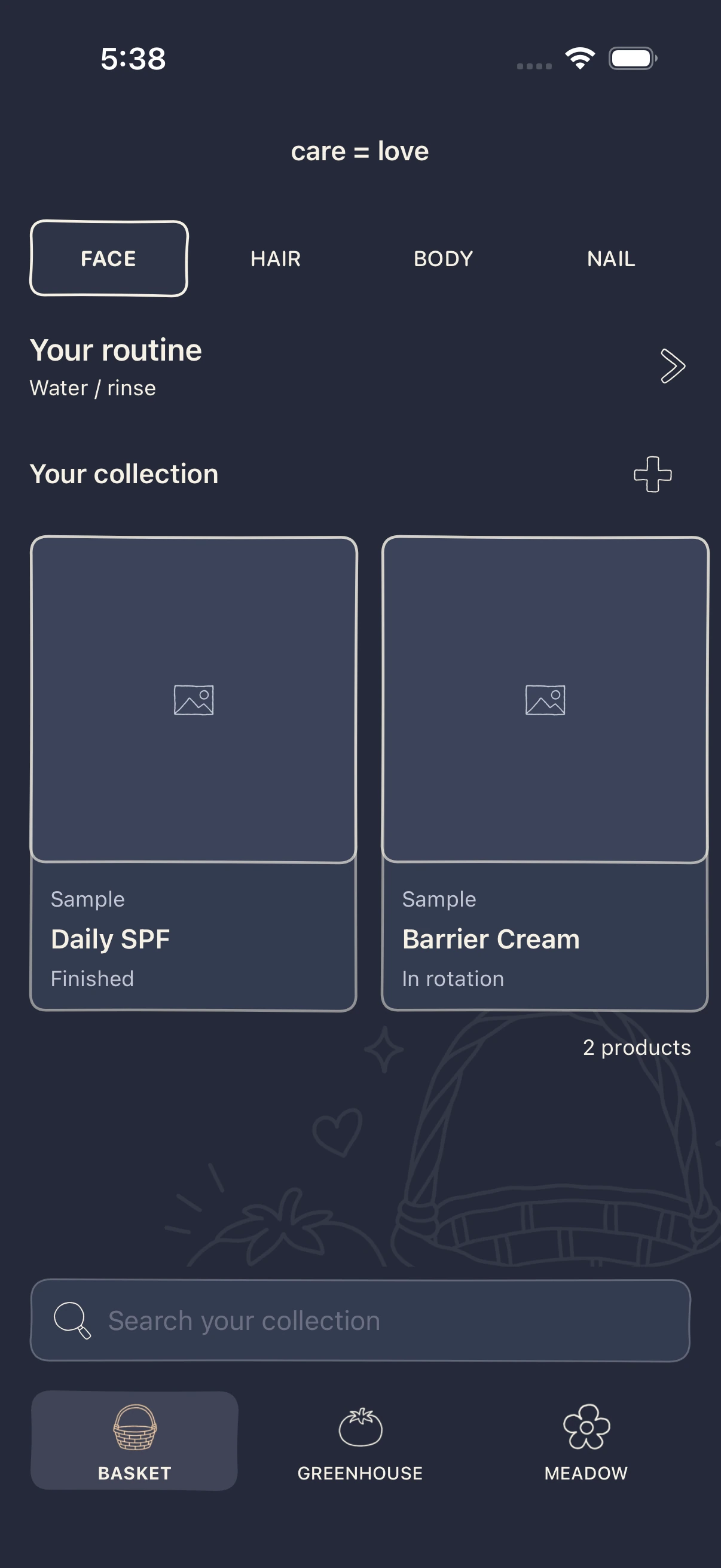
The routine source now supports optional actions alongside owned products. That creates space for care steps that don’t require buying or using a product. Routine membership and timing still need to be judged through actual use, rather than by assuming that showing a routine summary solves the whole experience.
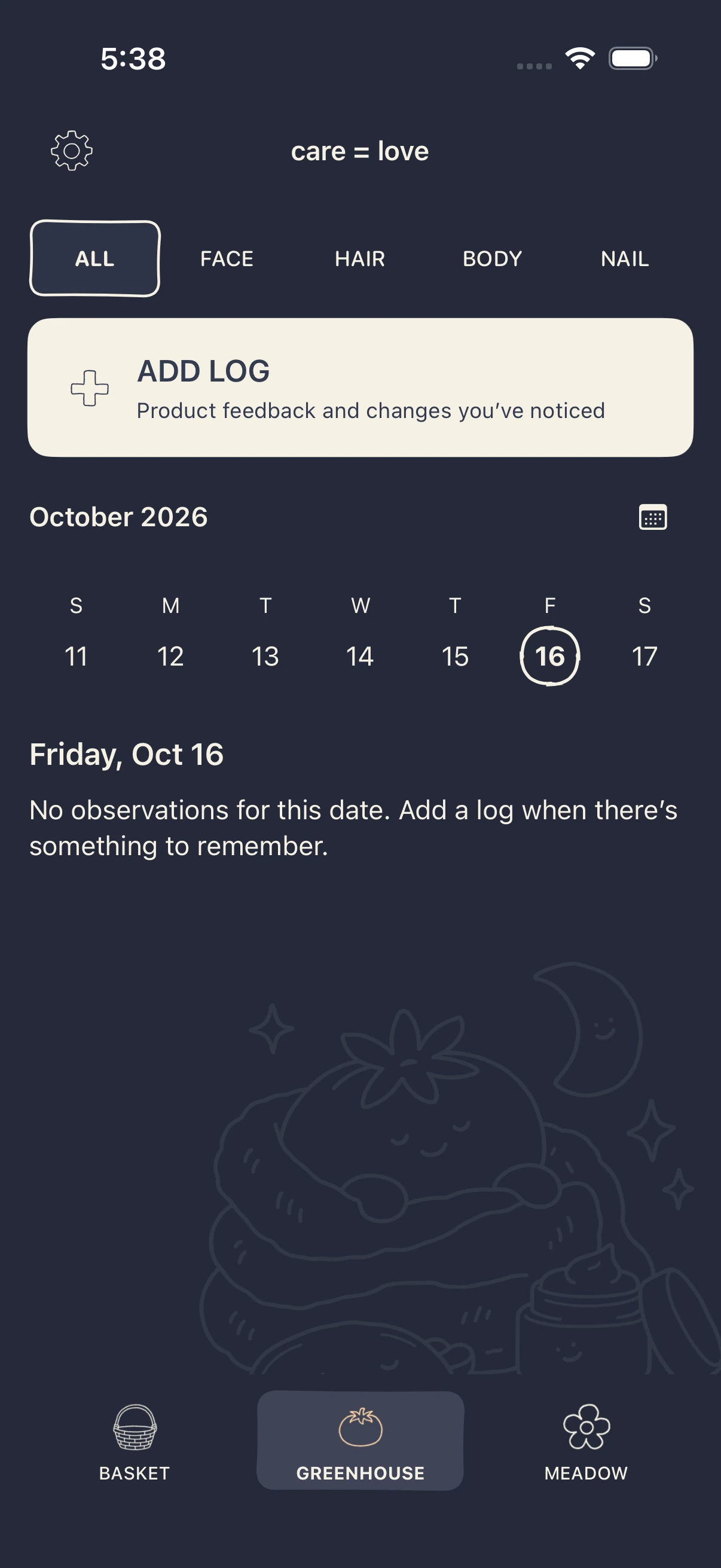
Greenhouse now centres dated observations. There are care-area filters, an Add Log action, a week strip, and an expandable calendar. The empty state tells me there is nothing recorded for that date; it does not imply I have failed to complete a daily task.
The observation composer asks, “What did you notice?” Product feedback comes first. Products can be linked when the observation concerns using them. An experience rating and health or condition details are optional.
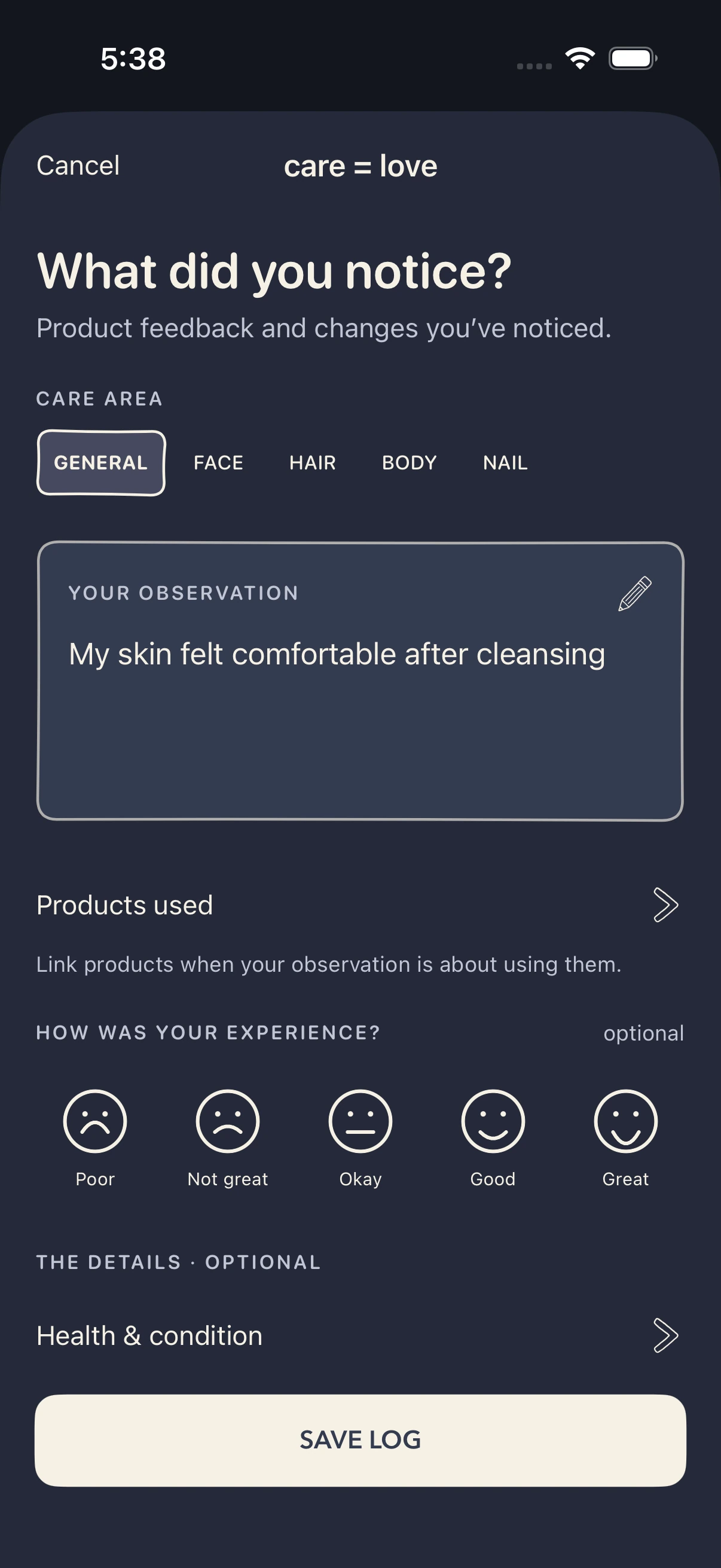
The form is part of a broader move toward journal-like surfaces: irregular pen outlines, doodle controls, and a more consistent treatment across editing screens. The navy-and-cream screenshots show the night palette. They should not be described as a completely new single-colour identity replacing every other appearance.
The tomato character and care scenes are present in these screens. The visual review notes still distinguish retained artwork from final approval, and exclude a rejected sheet-mask direction. I haven’t treated the presence of an image in the app as proof that every illustration decision is settled.
Meadow is still a place to read and remember
Meadow contains sourced reading and a route to check what I already own. The current screenshot shows articles about sunscreen labels and testing a new product.
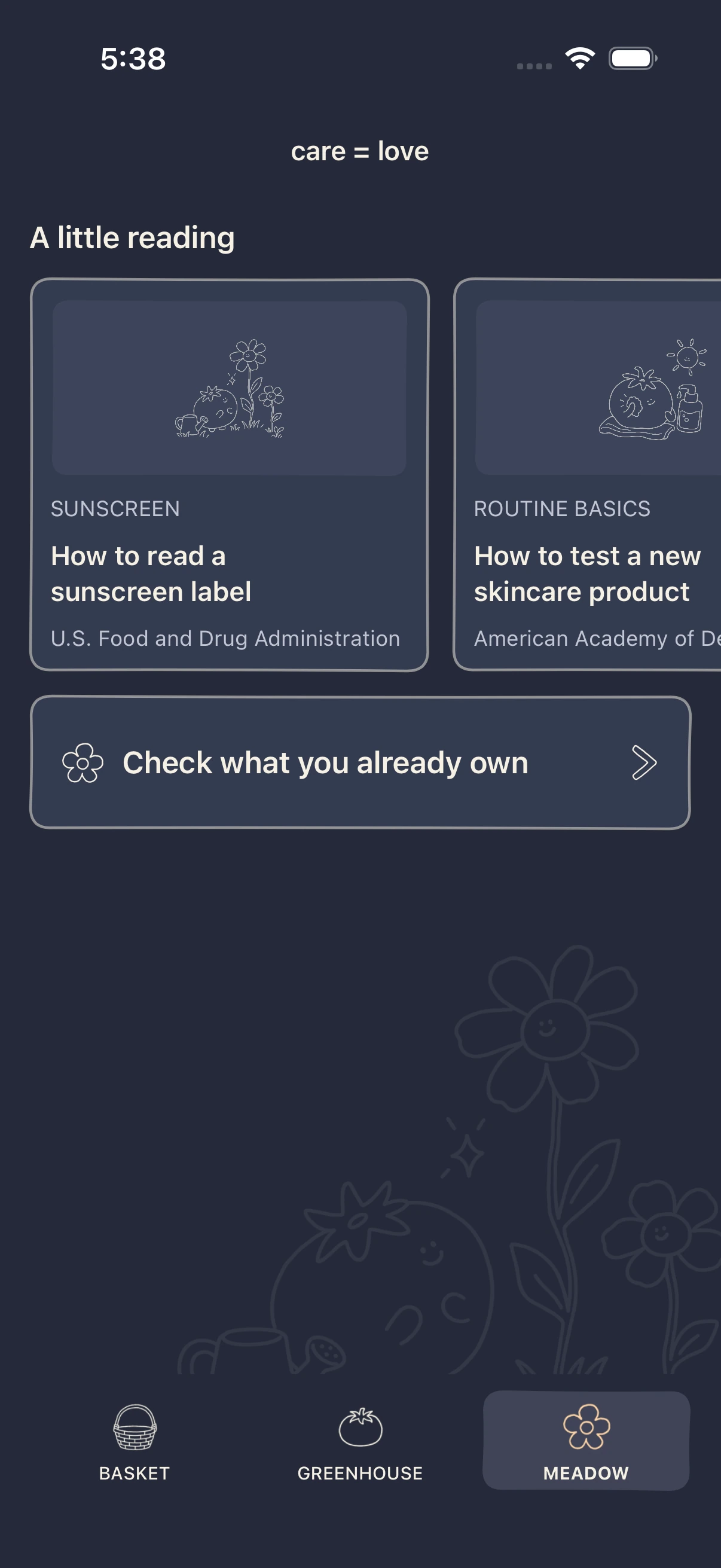
The larger intention is still recommendations informed by my previous products, skin context, and an estimated spending range, with a few affordable and high-end alternatives. That is a product direction, not a finished recommendation engine.
Native purchase records and range controls provide some groundwork. They do not, on their own, establish that the app can research, compare, or recommend new products reliably.
What is checked, and what is still open
The retained October 16 simulator results include a passing five-test focused run covering doodle consistency and a care-log interaction, followed by a passing two-test run covering manual product entry and the linked-product observation flow. Earlier attempts failed before those later checks. I’m not adding the totals together as though they represent unique coverage of the whole app.
The screenshots in this log were exported from the completed 17:38 simulator handoff run. They are authentic captures, not generated mockups. Later source and test records include additional form-button refinements, so these images are a dated visual checkpoint rather than proof of every final pixel in the working tree. I have not rerun the complete test suite for this documentation pass.
The next useful test is still my own end-to-end use: save a product, find it in the right place, arrange what I use, leave a small observation, and retrieve that experience when I’m considering it again. I also need to keep the catalog and personal data boundaries clear, improve import coverage without creating duplicate records, and settle the remaining illustration decisions.
The app is closer to the reason I wanted to build it. Whether it becomes useful purchase memory depends on that everyday loop, not just on having more screens.
Built with AI-assisted development. This log draws on this project conversation, repository history and source, the earlier development log, and retained simulator evidence. Local builds and test captures are distinct from a public release or wider user validation.