

Milestone 03 / care = love
Making the personal-use loop more dependable
October 18–23: recovery, photo-first entry, reversible editing, routines, and the everyday loop. Simulator checkpoints; wider testing remains open.
The last log ended with a better collection layout, ingredient research, and the first encrypted-backup foundation. Since then, the work has moved further into the things that determine whether I can actually rely on the app: recovering my records, finishing a product entry, cancelling an edit safely, and finding the right log again.
There has also been a lot of visual refinement. But the more consequential changes concern what happens between screens, especially when something fails or I change my mind.
This log includes the late October 18 continuation and work recorded from October 19–22. It was assembled on October 23. The screenshots are retained simulator checkpoints, not new photographs of the current phone installation.
From a backup foundation to a recovery flow
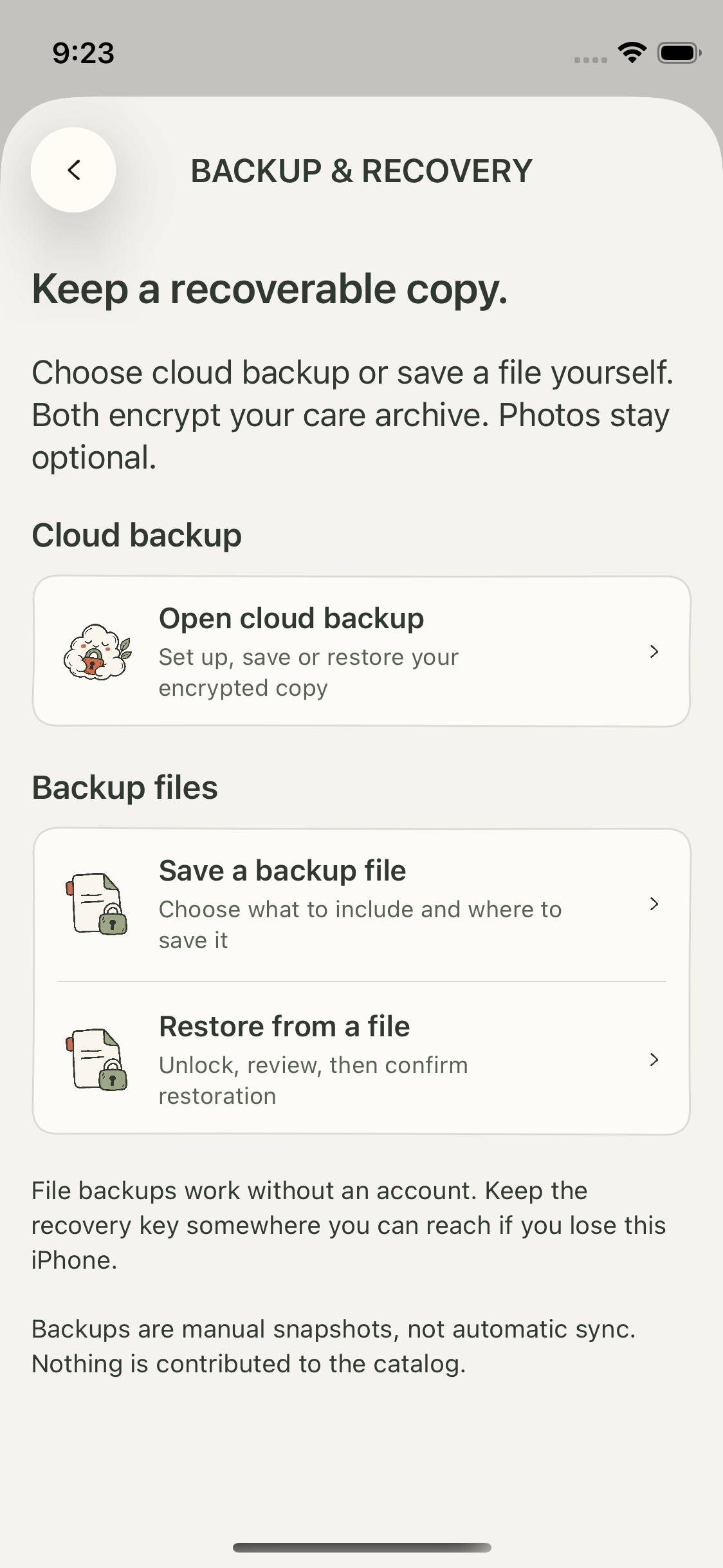
At the end of the previous report, encrypted archives were implemented and tested, while the complete user-facing flow was still unverified. The following work added file export, import, recovery-key setup, preview, and confirmed replacement.
The import path checks the archive in an isolated staging store before touching the live collection. Replacement has a protected local recovery journal so an interrupted operation has a way to restore the prior state. That is an implemented recovery protocol with injected-failure tests, not a claim that every power-loss or low-storage scenario has been validated on a phone.
Cloud backup also moved beyond a proposed architecture. A development backend was activated with email-code sign-in, account isolation, encrypted upload/download, and deletion checks. The retained October 19 records document authenticated protocol tests and a native encrypted round trip using disposable fixtures.
These are manual snapshots. They are not automatic multi-device synchronisation. File backup remains available without an account, and personal photos and profile information have separate inclusion choices. Backing up private care records does not contribute them to the public product catalog.
Signing in was not the same as being ready to back up
The first physical test exposed a problem the technical implementation did not resolve: the flow was confusing.
I could complete account sign-in and still encounter a disabled backup action because recovery-key setup had not been completed. Setup sent me through file export, which repeated choices and made a cloud-backup prerequisite feel like an unrelated task.
The subsequent UX work separated account access from recovery access and clarified the connection between setup, saving a recoverable copy, and restoring it. Settings and onboarding received clearer grouping, restore entry points, more direct copy, and illustrated explanations.
The recovery tests also produced a useful distinction. An owner-observed no-photo cloud restore was recorded in the isolated physical test app. Later, the main-app file recovery was owner-confirmed: restoration and reopening worked, records remained after an update, and a fresh export could be opened with the same working key. The documented preview contained two products, one observation, and no photos.
That does not close every recovery question. An earlier persistence incident remained unexplained, physical interruption testing was incomplete, and the separate Care Backup Source installation was retained. A successful file test is not evidence that every cloud replacement and device-loss scenario is finished.
A separate candidate, with more honest release evidence
A separate release-candidate checkout preserved the existing work and made it possible to continue without treating the original folder as the latest app.
Part of the work was correcting what the validation evidence actually meant. Earlier shorthand test totals were unpacked into unit tests, UI tests, skips, interrupted cases, and cases with no completed outcome. A successful unsigned archive established compilation; it did not establish signing, App Store readiness, or a fully tested interface.
Local storage failure also received a non-destructive retry screen. Failing to open the store should not quietly replace it with an empty database.
No public release occurred during this period. Release cloud configuration, public policy/support readiness, device scope, and wider acceptance remain separate gates.
Routines became more specific without requiring more products
Oral care joined the active care areas, alongside Face, Body, Hair, and Nail. Existing stored category values remain readable, including legacy content that is no longer suggested for new entries.
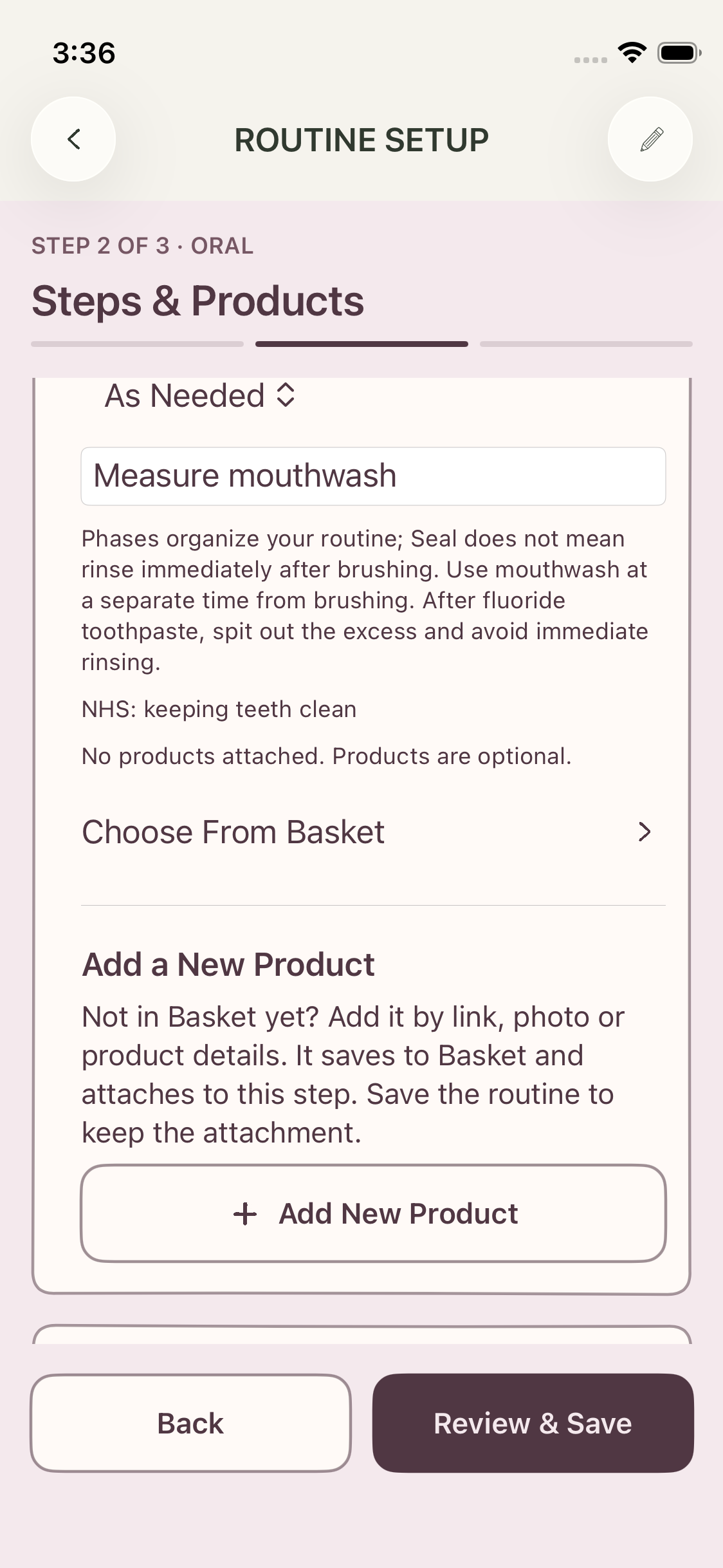
Routine setup gained optional phase-based organisation using the supplied care-only mappings. Phase labels include Prep, Prime, Treat, Seal, Protect, Finish, and Care, with availability depending on the routine and care area.
Nothing is automatically selected. New steps default to As Needed, and a step can contain an action, a product, both, or neither while it is being arranged. Repeated steps can be reordered within their phase.
Named Weekend, Event, Travel, and Self-Care Sunday routines keep separate saved identities. Saving Travel should not overwrite another occasion routine. Existing unnamed occasion data remains available rather than being discarded.
Adding a product now starts with something recognisable
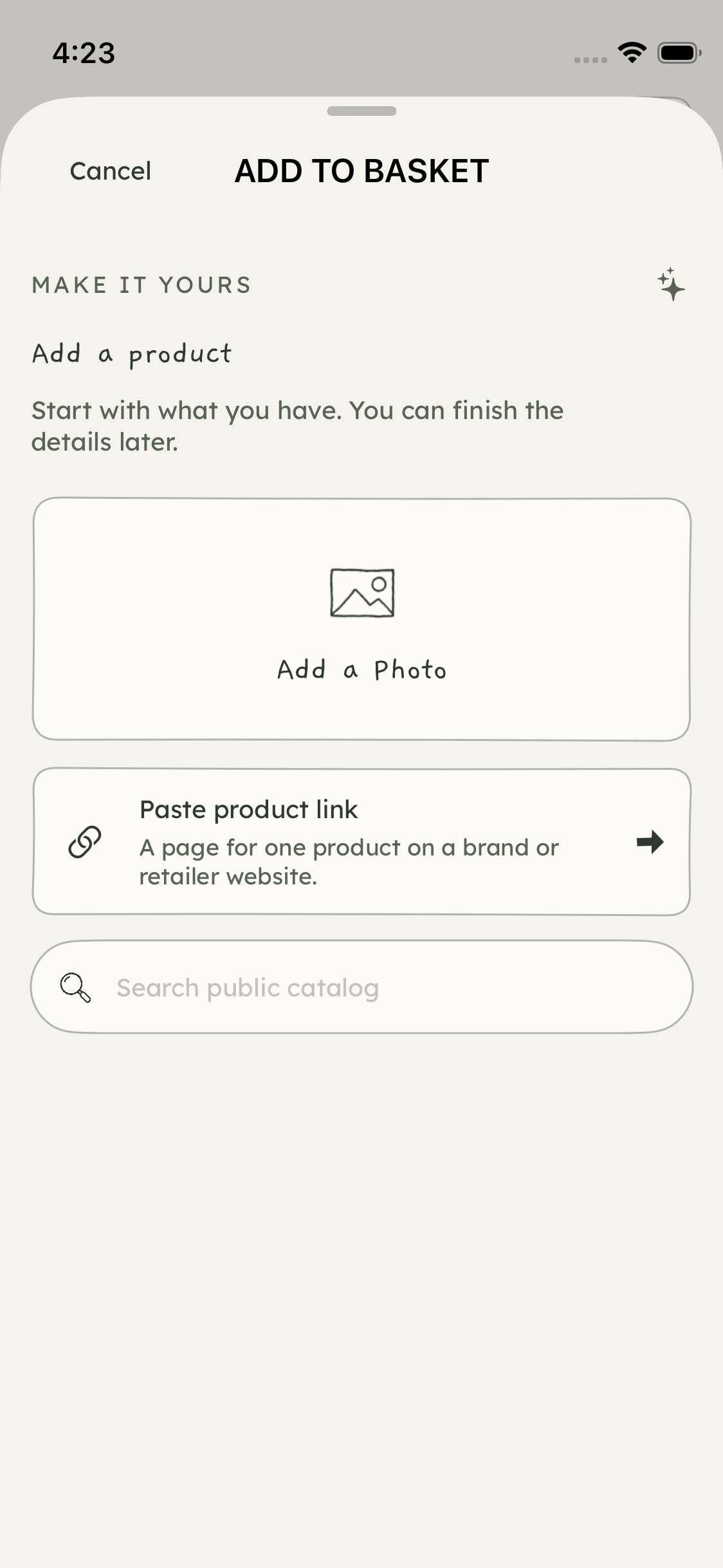
The add flow was revised to lead with a large Add a Photo tile. Paste Link remains available, and public-catalog search became a directly editable field with results and empty or unavailable feedback on the same screen.
The redundant initial details action was removed from that chooser. Details are completed through the selected path, with fallback behaviour retained when a page or match is incomplete. Photos remain optional even though the chooser gives them visual priority.
A save-navigation defect was also addressed. Successful product entry should finish the relevant sheets in the right order and deliver me to the saved product, with an optional invitation to add a photo. Completion should be visible rather than leaving me wondering where the product went.
A sticker and a full photograph are different choices
The photo work became a reversible editing flow rather than a one-shot cutout.
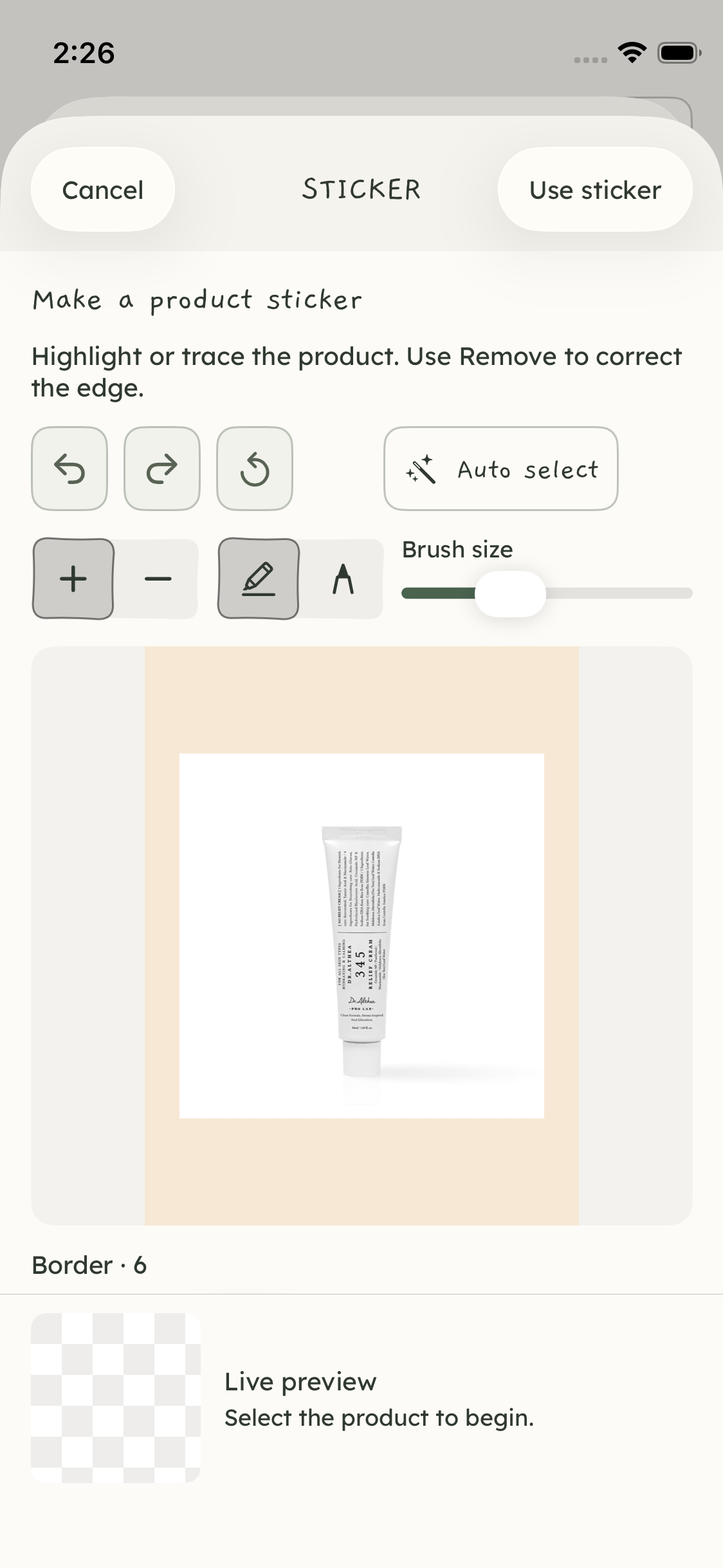
The sticker editor includes automatic selection, Highlighter and Pen tools, Keep/Remove correction, brush control, undo/redo, and a live preview. Selection overlays were adjusted so repeated strokes do not keep stacking opacity.
Both Make Sticker and Use Full Picture continue into framing. Crop, rotation, reset, and returning to edit the cutout are available before proceeding. Full-picture saving no longer silently substitutes an automatically generated cutout.
The original image, derivatives, selection mask, and framing settings remain distinct. Reopening should preserve the chosen presentation; cancelling should not commit staged edits. Compatibility work keeps older photo recipes and backup data readable.
Basket needed behavioural repairs as well as cleaner cards
An audit documented twenty findings across visibility, product identity, catalog navigation, cancellation, save feedback, and detail composition.
The repair work addressed products disappearing from All, clarified care-area and filter scope, aligned name-only entry and duplicate checks, and made Stored the default for new records unless another status is explicitly chosen.
Catalog navigation was repaired so going back preserves useful results, a new query performs a new search, and a failed save stays in review. Photo edits are staged until saving, draft recovery is local, and deletion paths preserve observations while handling product links and routine cleanup deliberately.
These were targeted repairs to the personal-use loop. Passing those checks does not establish reliable extraction from every retailer or eliminate the need for real-use testing.
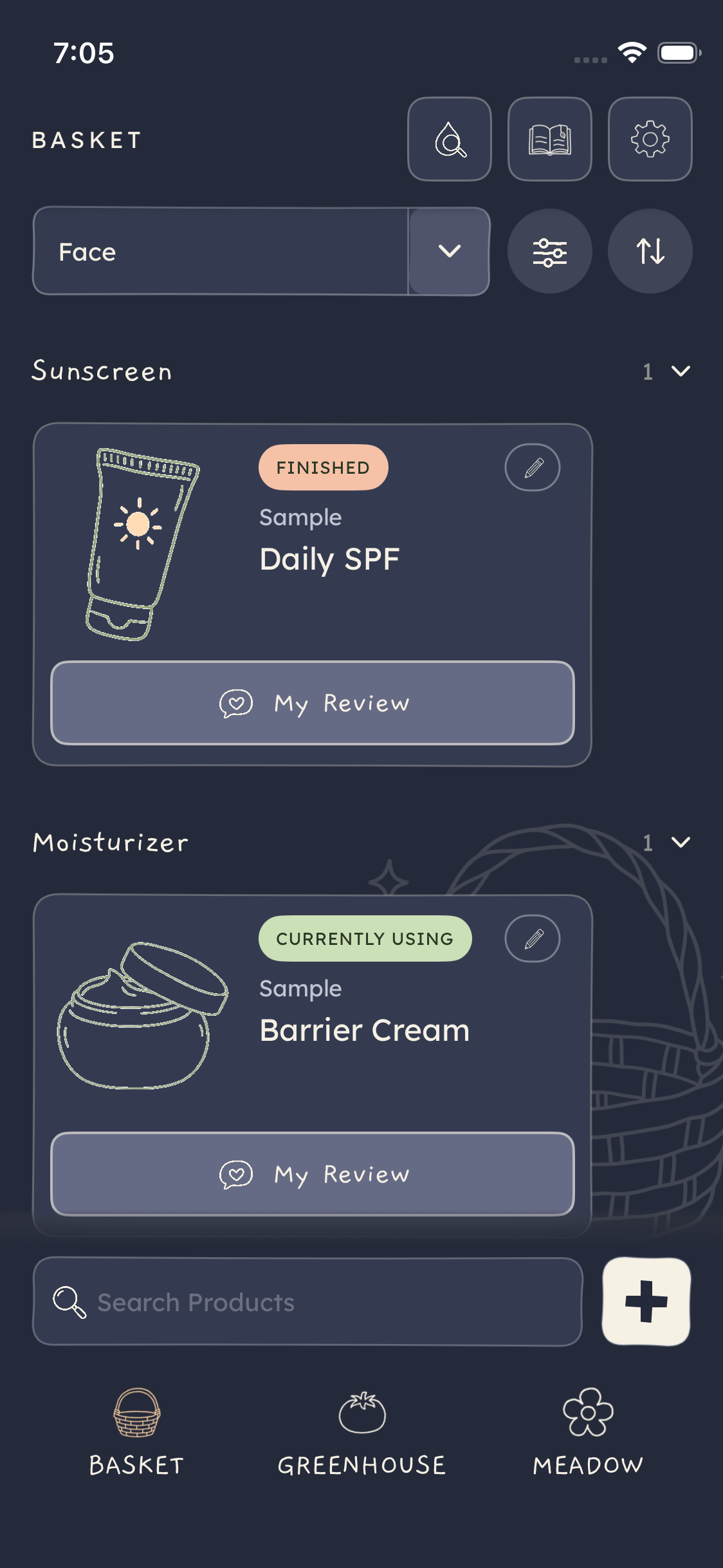
The visual pass then gave the cards a more legible hierarchy: fitted product art, colour-coded uppercase status pills, a compact Edit action, and a centered My Review control. I explicitly asked for My Review to look like a button; the later version uses a shaded face and stronger border.
Filter and Sort moved beside the care-area dropdown. The footer is left for Search and Add, with a short fade above the controls rather than through them. Product review editing also gained a clearer identity header, verdict choices, writing area, optional tags, and one anchored save action.
Greenhouse: a calendar panel instead of floating dates
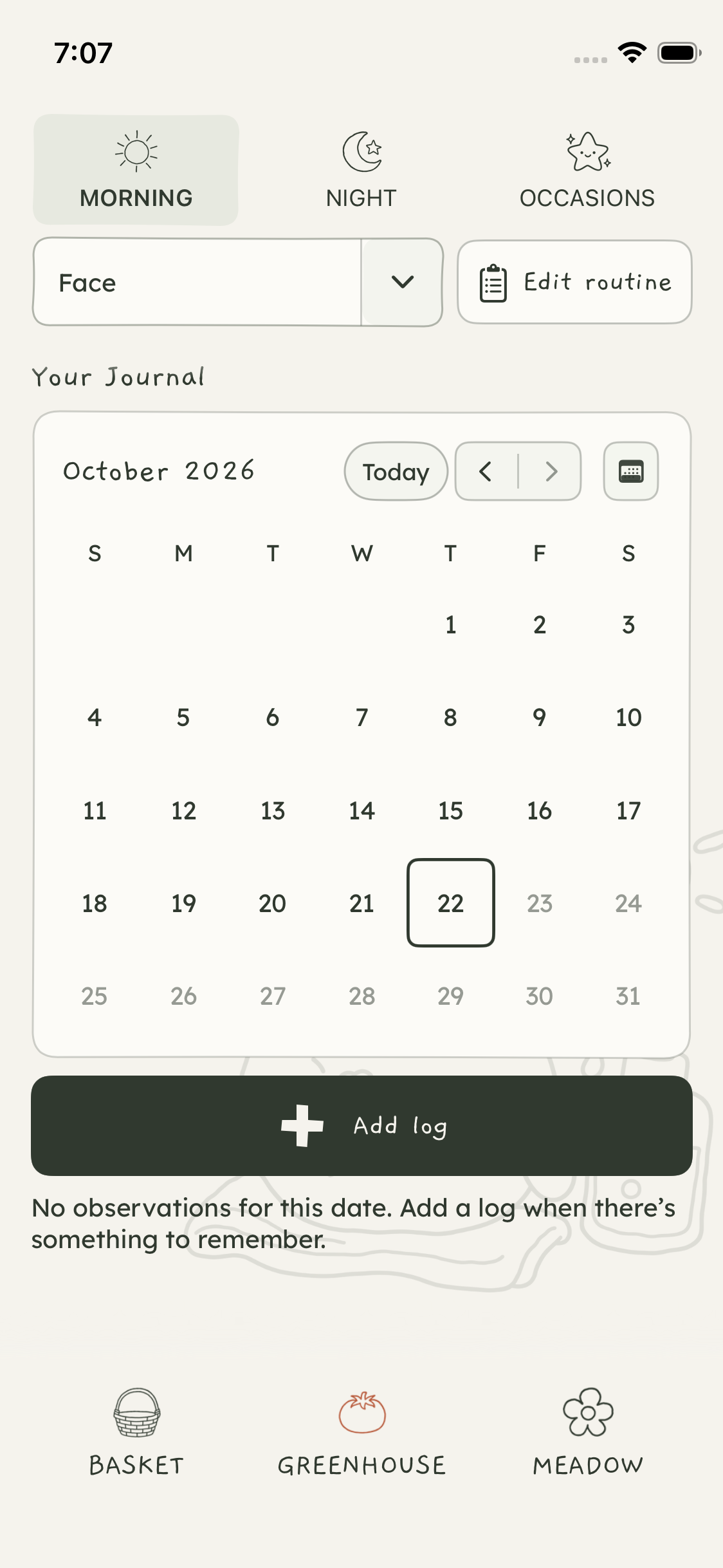
The day selector went through several revisions. The floating weekday/date composition was replaced by a compact calendar panel with a month heading, Today action, week/month access, and selectable days.
The later pass moved the journal content upward, joined the calendar arrows into one bordered control, and made the week and month date cells consistently square. Selected dates and dates containing logs have distinct treatments.
Care-area selection and Edit routine sit in the pinned header. Occasion selection became a floating overlay so opening it does not push the rest of the row down. Add Log follows the calendar.
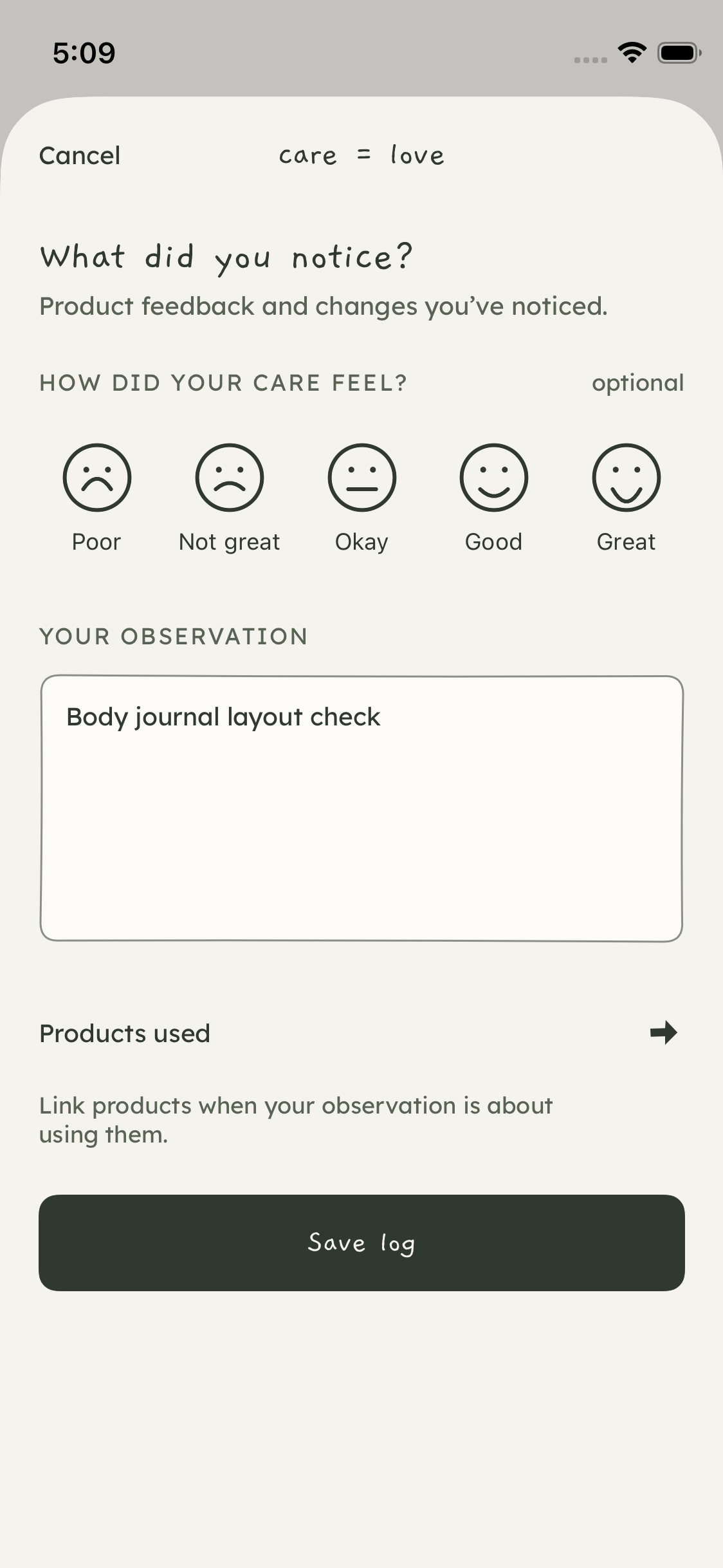
The log composer was simplified too. It inherits care-area context from Greenhouse, puts the optional experience question before the observation, removes the separate care-area and Details controls, and makes the observation visibly editable. Save Log follows the main content.
A stale sheet-context issue was corrected by capturing the selected area and date when Add Log is tapped. A focused synthetic Body-save/Face-filter check passed afterward. Physical cross-area filtering still deserves a deliberate recheck rather than being assumed correct from appearance.
Meadow became more contextual without becoming an AI recommender
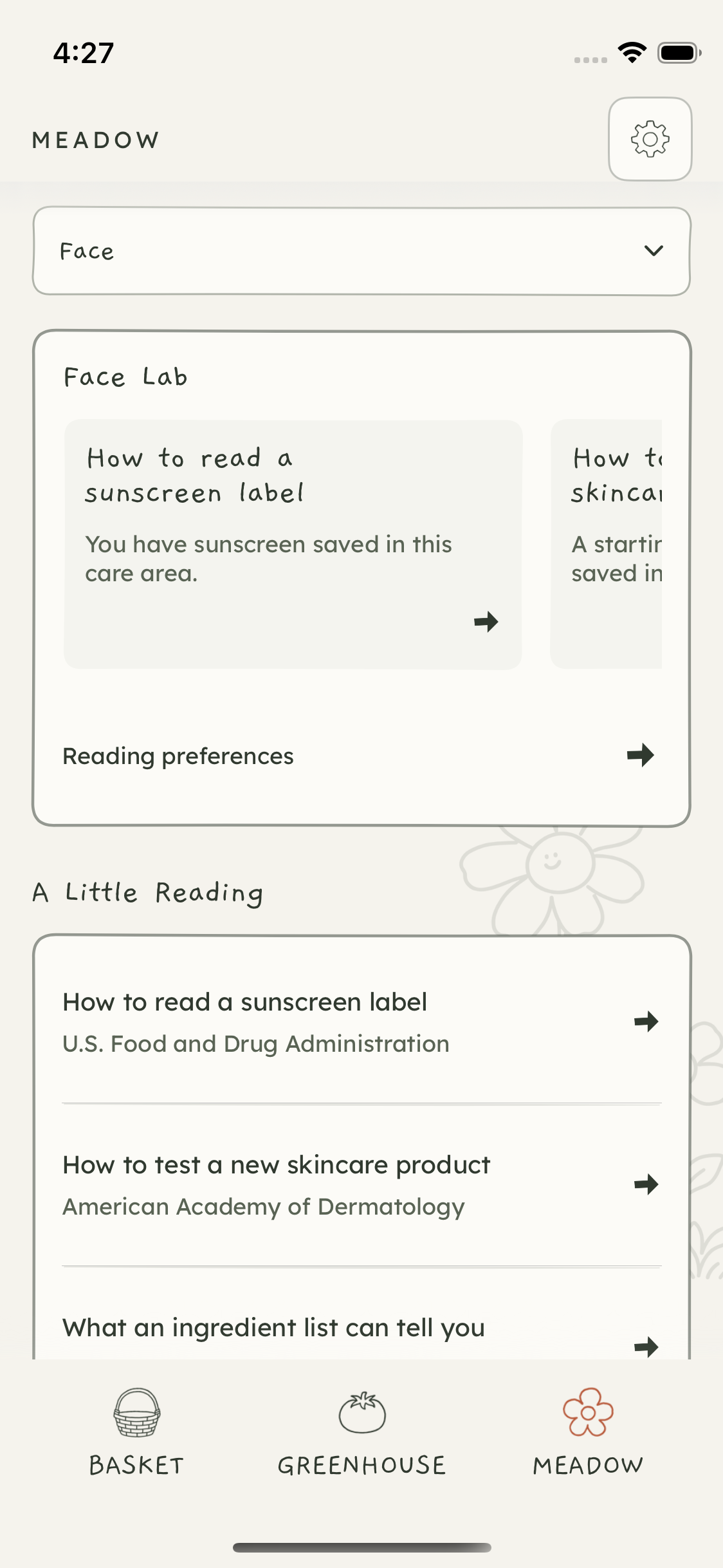
Meadow now follows the selected care area across reading, available research, remembered products, and buying recall. A missing area-specific article is presented as a content gap rather than filled with invented advice.
The Lab sections connect reviewed editorial material with optional saved profile details or products through deterministic on-device matching. The interface explains why an article appears and provides a personalisation opt-out. This is article matching, not generated medical advice or a finished new-product recommendation engine.
The composition was tightened around a care-area dropdown, Lab content, reading, and memory-related actions. Shared headers, bordered controls, and background continuity were also refined.
Accessibility and the shared visual language
The period included a broader action-system pass: clearer filled and outlined roles, more visible enabled secondary actions, shorter labels, consistent touch areas, and treatment of destructive actions distinct from ordinary alternatives. Handwritten headings and labels, readable body text, doodles, and the existing palettes were retained.
Scoped checks covered larger text, contrast, keyboard focus, recovery input, dropdowns, and reachable save/cancel controls. The owner reported that a basic physical VoiceOver check worked and that the Reduce Motion comparison produced no perceptible difference. Those observations are narrower than complete accessibility acceptance.
Later feedback explicitly sequenced work as UX first, then default UI, then accessibility. Some of the newest calendar and card changes therefore still need renewed accessibility review. An earlier large-text shared-footer truncation remains documented; it should not disappear from the handoff just because other checks passed.
What was verified, installed, and left open
The evidence contains several different kinds of progress:
Development backend: October 19 authenticated protocol checks and a native encrypted round trip were recorded, using disposable fixtures that were subsequently cleaned up.
Recovery on the phone: owner-confirmed main-app file recovery and reopening, with a no-photo test archive; cloud recovery evidence is separately qualified.
Basket repairs: a successful 196-test unit-run report with an explicitly skipped live hosted-service check, plus thirteen distinct targeted UI checks with passing executions across repair runs. These are not a complete current UI-suite result.
Photo tools, routines, Meadow, and accessibility: retained focused checks and screenshots for their respective candidate versions. Their totals are not added together as though they describe one final build.
Installation: updates were installed in place on the iPhone during the period. The latest retained October 22 installation record confirms the square-calendar build was signed, installed, and launched without uninstall/reset. Owner confirmation of that exact update’s visual result and record continuity was still pending in the record.
This documentation pass did not change the app, rerun the full suite, inspect private recovery keys, or perform another installation. The screenshots are authentic simulator captures from named checkpoints; they do not all show the same build or palette.
The next meaningful test remains the everyday loop: add something, find it, use it in a routine, leave a thought, recover it when necessary, and return to that experience before buying again. There is much more of that loop implemented now. Trust in it still depends on finishing the remaining recovery, physical-device, and accessibility checks.